CRM for building companies
The CRM a post-frame builder runs the whole job on
Leads route to the rep who covers that county, each card shows how long the lead has waited, and the building, the quote, the contract and the customer's link share one record.
What a construction CRM has to do for a building company
A construction CRM tracks who asked for a price, who is working them, and what happens next. What matters is what the record is built around.
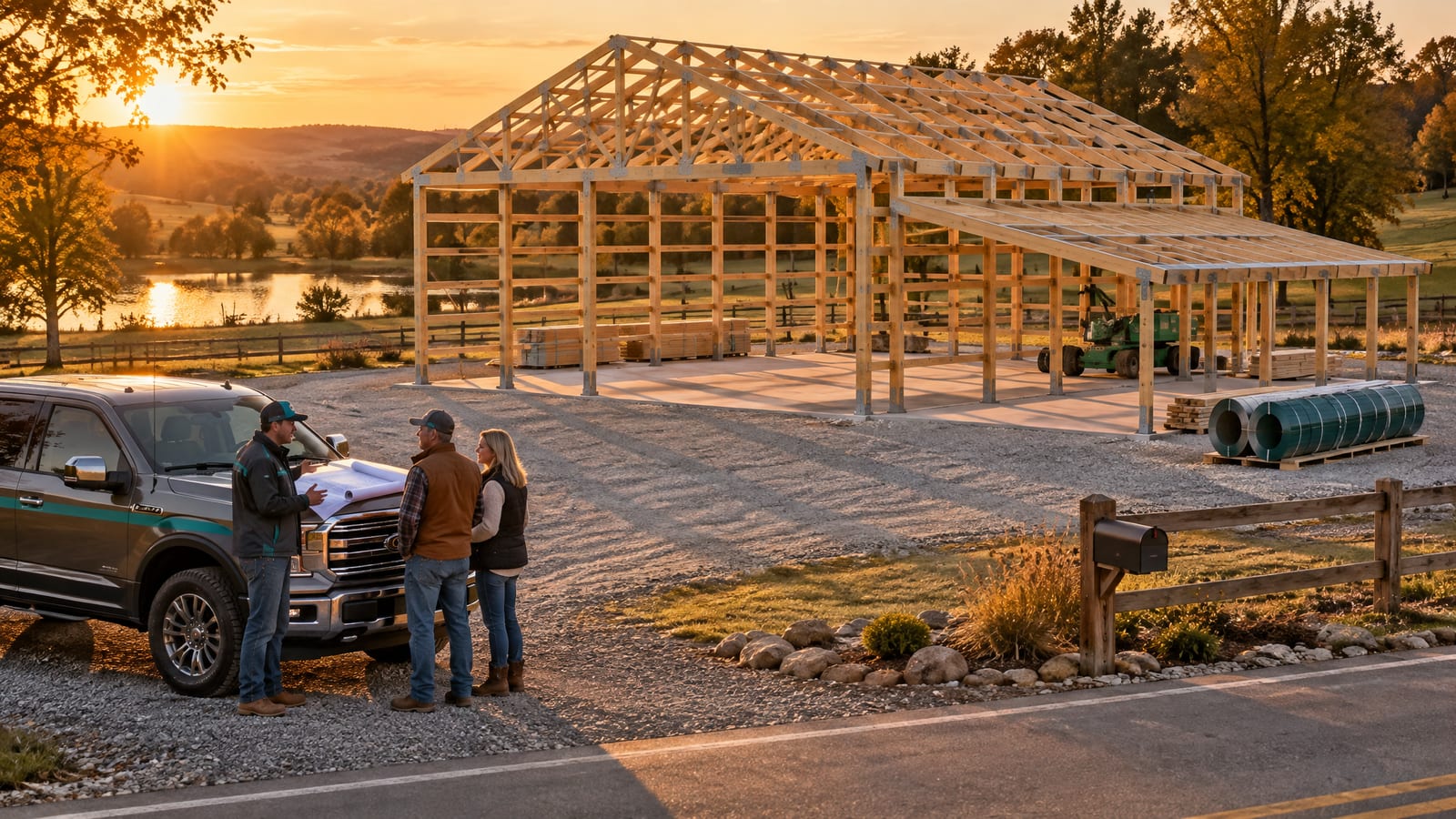
A remodeler's CRM is built around a client and a scope of work. A commercial contractor's is built around a bid. A post-frame, pole barn or metal building company sells a building: a 40x60 shop with a 14' eave, a 12' lean-to on one sidewall, two overhead doors and a slab. The customer wants a price, an answer on whether his county wants a permit, and a start date. He has asked two other builders the same thing.
Five tests to run in any CRM demo, whoever makes it:
- Submit your own web form at 9 p.m. on a Saturday. Whose phone knows, and how fast?
- Enter the same person twice, once from the form and once from a home show sheet. One record or two?
- Quote the 40x60 with the lean-to. Does the price come off the building, or does someone retype a takeoff?
- Change the price after it has gone out. Does his link update, or do you email a version two?
- Take it to a signed contract. Count how many times his name and the price get typed. Already paying for a marketing CRM for pole barn builders? Run the same five tests on it.
Leads2Build is built to pass those from one record: the card, the 3D design, the estimate, the agreement and the customer's page are one deal, not five files in five tools. Once the job starts, that record carries the talk too: a post frame team chat app where anyone can link the exact stage, invoice or change order.
Where building sales leak between tools
The leaks are rarely the pitch. They are the handoffs between tools.
The Saturday lead nobody called
A Facebook lead ad lands at 9 p.m. Saturday. By Monday he has talked to two other builders, and the first real answer set the number.
The history lives in a rep's phone
The voicemail with his budget, the texts about door sizes, the site photo. When the rep leaves, the deal leaves too.
The permit turns up after the price
He said yes, then the county wanted a permit and stamped drawings. Somebody eats that cost.
A quote you can't see into
The PDF went out Tuesday. Did he open it, forward it to his wife, or never see it? Your follow-up is a guess.
From lead form to signed agreement on one record
How a post-frame sale moves through Leads2Build. Stages advance on real events: an estimate sent, an approval, a signature.
The lead lands and routes itself
A web form, a Facebook or Google lead ad, a spreadsheet or the New Lead button: each becomes one card per customer, routed to the rep who covers that area.
The first call, while it is hot
The card reads HOT LEAD for five minutes, then COOLING. Press Call and the built-in phone dials from your business number; the card moves to Contacted when the call connects.
Draw the building from the card
Create Estimate opens the 3D designer with the customer filled in. The material list comes off the drawing, priced from your own price book.
Send a quote he reads on his phone
A page, not a PDF: his building in 3D, the spec in plain words, the price, the payment schedule and Approve & Sign. You see when it is opened, by whom, and for how long.
Approval writes the contract
He approves and enters his legal details once. The agreement is written from the approved price and payment stages, with the lien notice for the build site's state. You release it; he signs, you counter-sign.
Start Project hands it to the build
The sales board ends at Ready to Start. Start Project opens the job, and his quote link becomes his project dashboard.
Every building sale on one board
Nine stages run from New Lead to Ready to Start, and each column shows how many deals sit in it and what they are worth.
Each card says whose move it is without being opened: the lead source, the building type, the rep who owns it, how much of the stage checklist is done, the next action, the permit answer and the county, and a STALE flag when a lead has gone quiet.
Who gets the lead is settled before anyone argues
Every new lead gets the same five questions, in order: who covers that county or ZIP, who has priority there, who is already full, who is carrying least, and, if nobody is free, who your top performer is. It never parks a lead. That routing is the core of pole barn lead management: the first call goes to someone who can take it.
Start simple: set the counties each office serves and drop reps onto an office. When a rep needs their own patch, draw it on a map, with a backup tier so a buried rep's leads still move the same day.
The pieces a building sale needs
Each has its own page if you want the detail.
Missed-call rescue
An unanswered call becomes a task due now for whoever owns that line, named for the caller. Three calls in ten minutes is one task.
See how it worksThe callback clock
Time from a first missed call to the first real callback or text, per rep. Tapping 'I got this one' clears the list but never improves the number.
See how it worksOne conversation per customer
Texts, emails, calls, voicemails and photos in one thread on the customer, owned by the business, not a rep's phone.
See how it worksQuote tracking
An alert on the first open, the seconds actually spent reading, and a forwarded quote shows as a second reader. Your own previews never count.
See how it worksStage checklists
Your steps on each stage, so a new rep works a lead like your best one. A deal with an estimate can't pass Contract Sent until a contract has gone out.
See how it worksSales analytics
Time to first contact, win rate, days in each stage and skipped steps, from timestamps your team already created.
See how it worksWhere Leads2Build fits among the CRMs builders shortlist
Each of these is built around a different kind of sale. Here is what each vendor says it was built for, beside how Leads2Build handles the same job.
| What matters | Leads2Build | Other CRMs on the shortlist |
|---|---|---|
| Built around | Post-frame, pole barn, barndominium and metal building companies selling one building at a time. | Home builders and remodelers (Buildertrend); many trades, from remodelers to roofers and pool builders (JobTread); bid pipelines for GCs, custom builders and specialty trades (Pipeline CRM); RFP pursuits for general contractors (Buildr). |
| Getting leads in | Website forms, Facebook and Google lead ads, spreadsheets or a connected CRM, as one card per customer. | Well covered: web-to-lead forms (JobTread); Excel import and contact-form capture (Buildertrend); a business card scanner for trade shows (Pipeline CRM). |
| Who works the lead | Routed on arrival by territory, priority, workload cap and fair share. | Salesperson, confidence and projected sale date kept on each lead (Buildertrend); automations that route new RFPs to the right estimator (Pipeline CRM). |
| Keeping in touch | Stalled deals flagged with the next move; saved messages for one-to-one texts and emails. | Automated email marketing campaigns (Buildertrend), a real strength if you market to a large list. |
| The quote | Drawn in 3D, material list off the geometry, read by the customer as a live page he approves. | Proposals with e-signatures (Buildertrend, JobTread); bid stages that include takeoff (Pipeline CRM). |
| After the sale | Agreement, counter-signature and Start Project on the same record; one customer link throughout. | Project management and client portals (JobTread, Buildertrend); online payments (JobTread); QuickBooks sync (Pipeline CRM); a Procore integration (Buildr). |
Other CRMs as described on each vendor's own CRM page, as of September 2026. Each is strong at the work it was built for; this table is about fit, not a scorecard.
Keep reading
Walk a 40x60 from
lead form to signature
A post frame builder CRM for pole barn and barndominium shops: leads routed to the right rep, with the 3D design, quote, contract and deposit on one thread.

 Leads2BuildBUILDER OPERATING SYSTEM
 Leads2BuildBUILDER OPERATING SYSTEM
Questions builders ask
What is a construction CRM?
It is customer relationship management software shaped around how construction companies sell: leads from forms and ads, follow-up, estimates or proposals, and the handoff to a signed job. For a post-frame or metal building company, the useful ones keep the building, the quote the customer read and the contract on one record.
What is the best CRM for construction?
The one built around the sale you make. Buildertrend is built for home builders and remodelers, JobTread serves many residential, specialty and commercial trades, Pipeline CRM focuses on bid pipelines, and Buildr on general contractors' RFP pursuits. If you sell post-frame or metal buildings, look for lead routing by territory, a quote drawn from the building, and a contract written from the approved price.
Is a CRM difficult to learn?
It depends on how much you must build before it works. Leads2Build ships with nine sales stages and default checklists, routing can start with one dropdown per office, and the Academy walks a practice lead across your real board from arrival to first invoice, then removes it.
Can I keep using SmartBuild alongside a CRM?
Yes. SmartBuild is an integration partner, and shops running it keep running on it. Connect your own SmartBuild login and its jobs, estimates, drawings, colours and pricing are reachable inside Leads2Build. A setting picks whether new estimates start in SmartBuild or the in-house 3D designer; switching deletes nothing.
Is there a CRM app for my phone?
The Leads2Build mobile app is in beta testing: iPhone users install through Apple's TestFlight, Android users join Google Play testing, and the mobile app page explains how to request access. Your customers need no app; their quote, contract and project dashboard open from one link.
30 minutes with Keith · exclusively post-frame & barndominium
Bring one real job.
We’ll walk it lead to paid.
Keith Lemay, the founder, takes this call himself. You show how a job moves through your business today — the call, the quote, the contract, the build, the money. He shows you the same job in Leads2Build. We work exclusively with post-frame and barndominium builders, so none of it is generic.
- Pick a time — it goes straight onto Keith’s calendar.
- The confirmation comes by email, with a link to move it if you need to.
- Bring a job you’ve quoted lately. That’s the one worth walking through.
Keith's next open times
The confirmation comes by email.