Most of the House Book writes itself from the job: the estimate's colours and finishes, every approved selection with its product and specs (and what it replaced, if it was replaced), the subcontractor crews and the contractors the job had purchase orders with, the dates the contract was signed and each stage finished, and the final plans — the documents marked as-built, or the current plan revisions where none are. In the project's House Book card you fill the gaps: paint colours, the equipment & warranty list with serials and warranty papers, anyone missing, extra dates, maintenance notes and a welcome note. Switch on Share on the homeowner's page and it appears as Your House Book on the link they already have — and stays there, with a branded printable copy. One system for the whole post-frame job, from the first quote to the handover binder.
Also called: house book · homeowner manual · closeout binder · warranty list · home owner handover · as-built plans for the homeowner · homeowner handbook · closeout package · warranty binder
At closeout, most of it is already written
Open the House Book card and the compiled sections are there: Colors & selections from the estimate and every approved selection — with (replaced — originally …) where a product was swapped — and Final plans (as built): the documents marked as-built, or the current plan revisions where none are. They say where they come from, so you change them at the source and the book follows. How a selection keeps its product and its history is on selections & allowances.
A closeout binder means retyping colours, selections and plan names the job recorded months ago — so it never gets made.
Handing over the book takes minutes, because nobody retypes what the job already knows. And because it's compiled, what the homeowner gets matches what was actually built.
Paint colours, room by room
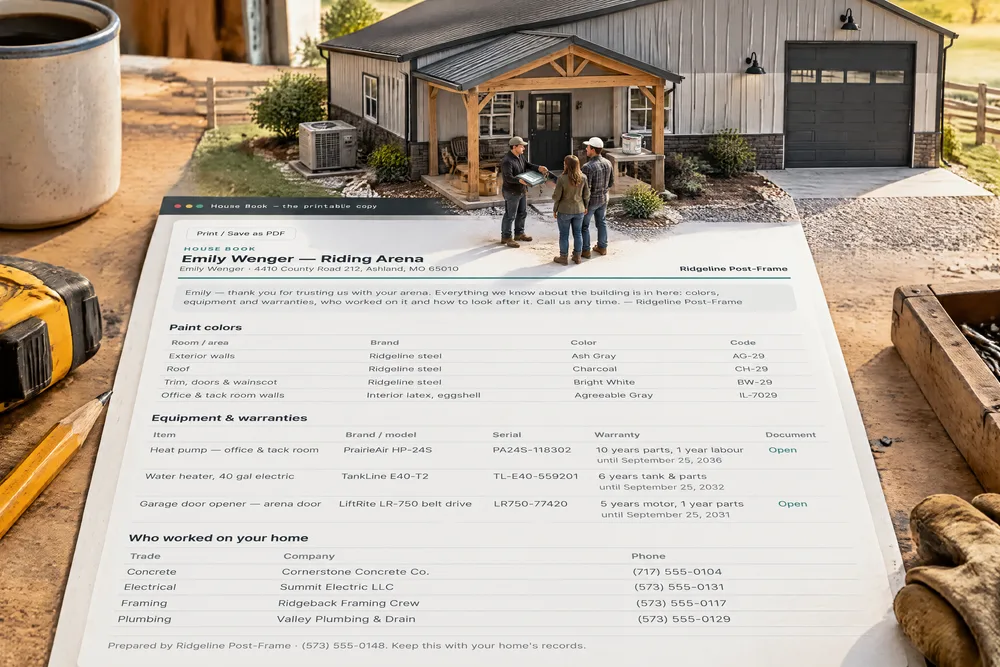
Try itPaint colors takes a row per area — room or area, brand, colour name and code — so the wall steel, the roof, the trim and the office walls are written down once. Exterior walls · Ridgeline steel · Ash Gray · AG-29.
Two years later the homeowner wants to touch up a panel and nobody remembers the colour, let alone the code.
The code is the part people lose — and the part the paint counter or the steel supplier needs. When the homeowner touches up a scratched panel in year three they get the right colour first time, and they remember who wrote it down.
Every piece of equipment, with its serial and warranty
Try itEquipment & warranties lists the heat pump, the water heater, the overhead door and its opener — each with brand, model, serial number, warranty term and the date it ends, and the warranty document picked from the project's documents or linked. Edit opens the form in place; removing an item takes it off the homeowner's copy too.
'Where's the warranty for the water heater?' — asked by a homeowner whose binder went out with the moving boxes.
A warranty claim needs a serial number and the paperwork — exactly what's gone a year after handover. Writing it down at closeout saves the homeowner a headache and saves you the call asking you to dig it up.
Who worked on the home — and their numbers
Who worked on the home fills in the subcontractor crews that were put on the job and the contractors it had purchase orders with — Concrete: Cornerstone Concrete Co. — and takes a row, with trade and phone number, for anyone it doesn't know about.
'Who did the electrical?' — and the builder's phone is the only place the answer lives.
A homeowner who can call the electrician directly for a small job calls you for the next big one. Your subs get the repeat work, and you stay the builder who made everything easy.
The dates they'll be asked for
Key dates reads the job: contract signed, work started, each stage finished and the project completed. Add the rest — the final walkthrough, the day the keys were handed over, the one-year warranty check-in — each with its own date.
Warranty terms and insurance forms ask when the building was finished, and the answer is a guess.
Insurance forms, warranty claims and an eventual sale all ask when the building was finished. A dated record answers in seconds — and quietly shows the job ran to plan.
How to look after it
Try itMaintenance notes is plain text in your own words — check the screws along the ridge cap twice a year; keep the downspouts clear before winter; replace the heat-pump filter every three months. Save House Book keeps it, and the card says Unsaved changes until you do.
A homeowner who never re-tightens a backed-out roof screw calls about a leak — and blames the build.
A steel building needs a little care, and the homeowner who knows what to check never calls about a leak in year three. It's cheaper to tell them once than to send a crew back.
Their copy, on the page they already have
Try itOn the homeowner's page it's Your House Book — colors, selections, warranties, who built what, and how to look after your home — opened by its header, with Print or save as PDF beside it. Selections show their picture, specs and what they replaced; warranties link their documents. It's a block of the live project dashboard on the link they've had since the quote, it stays after the job is done, and like every block on that page it's a switch in What They See.
The homeowner's questions start after the builder has moved on, and the answers are scattered across texts and emails.
Every 'what was that again' they answer themselves is a call you don't take — and a homeowner who has everything in one place is the one who recommends you.
Print it, or save it as a PDF — in your branding
Print in the card — or the homeowner's own Print or save as PDF — opens a clean page laid out for paper: House Book, the project, the owner and address, your logo or company name, the welcome note, then each section as a table — paint colours, equipment and warranties, who worked on the home — and Prepared by your company and phone number at the foot. Rows don't split across pages, and the print button doesn't print.
A closeout binder put together by hand looks different on every job and takes a day to make.
Some homeowners want paper, and a printout of a web page looks like one. A clean document in your colours is the last thing they hold from the job — with your name and number on it.
One card in the project window, facts on the outside
The House Book is one more card in the project window, beside Client updates and Homeowner messages. Closed, it says whether it's on the homeowner's page, how many warranties it holds and how many selections — and Print sits on its header.
Closeout paperwork lives in a folder nobody checks, so nobody knows whether the handover ever happened.
A project manager can see the handover is done without opening it. Closeout stops being a folder nobody checks and becomes a card that says it's finished.
- 1At closeout, open the project's House Book card — the compiled sections are already filled in from the job.
- 2Add paint colours room by room, the equipment & warranties (item, brand, model, serial, warranty term and end date, the warranty document), anyone missing from Who worked on the home, extra dates and maintenance notes.
- 3Save House Book.
- 4Switch on Share on the homeowner's page — it appears as Your House Book on their project page and stays there.
- 5Print — or the homeowner's own Print or save as PDF — opens the branded printable copy.
Two years after move-in the questions start — what was that paint, who did the electrical, where's the heat pump warranty — and the answers are scattered across texts, emails and a binder that went out with the moving boxes. The House Book is compiled from the records the job already has, so handing it over is a few minutes of filling gaps, not a day of retyping — and the homeowner's copy lives on a page they can't lose.
- Closeout documents retyped by hand from scattered records.
- Homeowners losing warranty and selection details after move-in.
- Handovers that never happen because they take a day to assemble.