What are the parts of an exterior door unit?
An exterior door unit is the slab (the leaf) hung in a frame: two jambs and a head, with a sill and threshold at the bottom, hinges on one side and the lock bore on the other, and casing or brickmould around it. An entry unit can add sidelites beside the door and a transom above it. Ours builds a walk door from those same parts, draws the sidelites and transom in 3D, and prices each part that has a price.
- Door makers name the frame, jambs, sill, threshold, hinges, bore and casing as the parts of a door unit. Simpson Door Company — glossary ↗
- An exterior door unit includes the sidelites and transom when it has them, along with the frame, sill and weatherstripping. Reeb — the anatomy of an exterior door ↗
Every account gets a library of the openings it sells: windows, walk-in doors, garage doors, sliding doors and interior doors, starting from the standard sizes builders order, each one editable. Add a Custom item with its supplier, product link (checked for you), model number, specs, and a base price and this estimate's price. Save any configured door as a preset — "Front entry, Shaker, half lite, black" — and set a default per kind for the company or for one design, so a right-click on a wall drops Window — 3050 without a menu (with right-click zones on, your default is the first row inside Windows, Doors or Garage doors). Rough openings follow your rules, not a guess: a window at its call size, at the unit plus your allowance, or from your maker's chart; a prehung walk door by the convention you frame to, with the threshold added for exterior doors; garage and sliding doors with what you add to width and height — each rule shown with a live example of what it frames. A walk door has its parts: sidelites, transom, jamb depth, sill, hinges, bore and backset, a multipoint lock, trim and casing, drawn in 3D and cut out of the siding. Any door choice — style, glass, handle and lock, colour — can be a Custom option with its own price and a look you can see on the model. A garage door can be pulled through to the opposite wall, the two linked so they move together.
Also called: window catalogue · door catalogue · door presets · rough opening rules · rough opening allowance · prehung door rough opening · door sidelites and transom · entry door configurator · interior door hardware · pull-through garage door · drive-through garage door · custom door option · supplier product link
The windows and doors you actually sell
Your windows & doors holds one list per kind of opening, starting from the standard sizes builders order — 2030 to 5040 sliders for windows, 3068, 3070, 6068 double for walk doors, 8×7 to 16×14 for garage doors — and every one of them is yours to edit. Custom… adds your supplier's product with its link, model number, specs and price. The list you keep is the list the panel and the right-click menu offer.
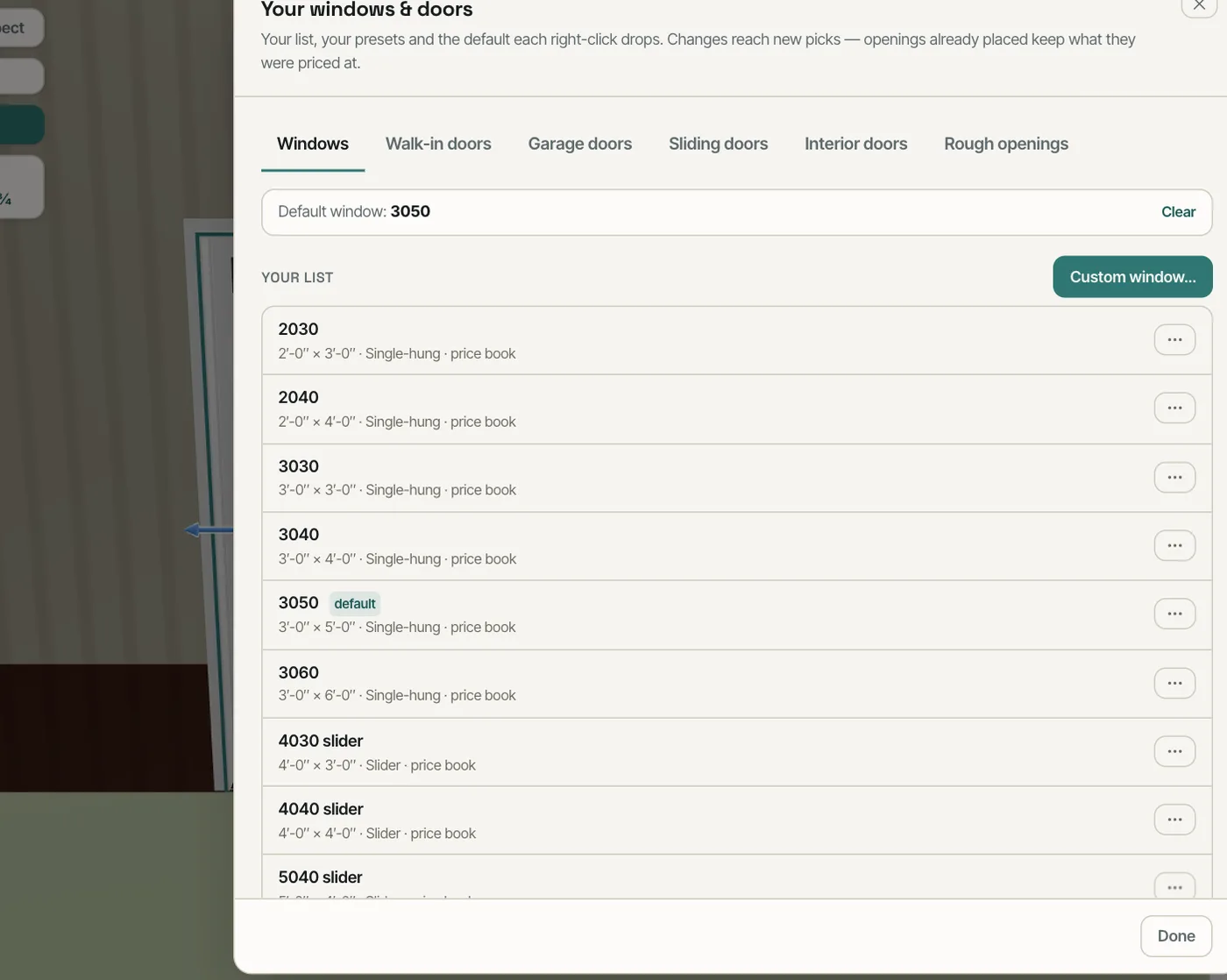
Generic sizes mean every quote begins with typing the same windows again, at prices from memory.
The quote starts from what you sell, so nothing gets re-typed and nothing gets priced off a generic size.
Rough openings sized by your rule
Pick how your rough openings are sized: a window at its call size, at the unit plus your allowance, or from your maker's chart; a walk door by the prehung convention you frame to, with what the exterior threshold adds; garage and sliding doors with what you add to width and height. Under the rules, What that frames shows the result for a 3050 window, a 3068 walk door and a 10×10 garage door, so you can see the rule before you trust it. New designs start with it; Use on this design applies it to the one open.
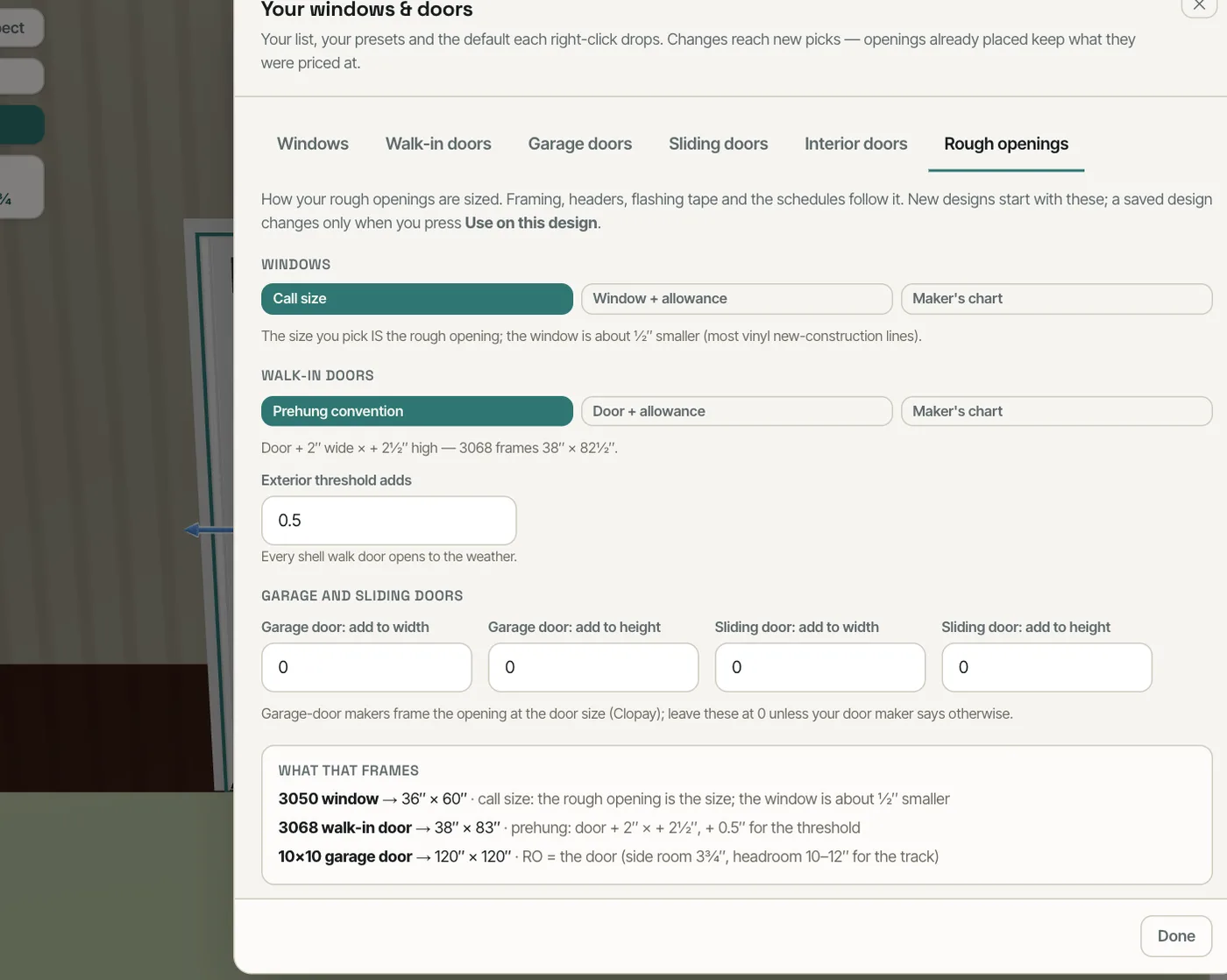
A rough opening the software guessed is a rough opening the crew re-cuts on site.
The framing, the flashing tape and the schedule all read the same rough opening — the one your crew cuts.
A walk door built from its parts
Open Unit & frame on a walk door and it has the parts a door maker lists: a transom, sidelites (left, right or both), jamb depth, sill and threshold, hinges, bore and backset, a multipoint lock, trim and casing. The door drawing has a round + on its left, right and top: press one to add that sidelite or the transom, − to take it off, and hover for its price. The drawing names each part when you point at it. In 3D the door and its sidelites and transom are one pre-hung entry unit — one frame and one casing round the whole unit, a mullion between door and sidelite and one under the transom, sidelites as full glass, glass over a panel or a solid panel, and the transom exactly the unit's width — cut out of the siding, and each part with a price lands on the estimate as its own line. The parts start at $0 — set your price rather than a made-up number: the row stays on the menu and says so, a part at $0 writes no line, and the price you save — for the company or for this job — is the one used.
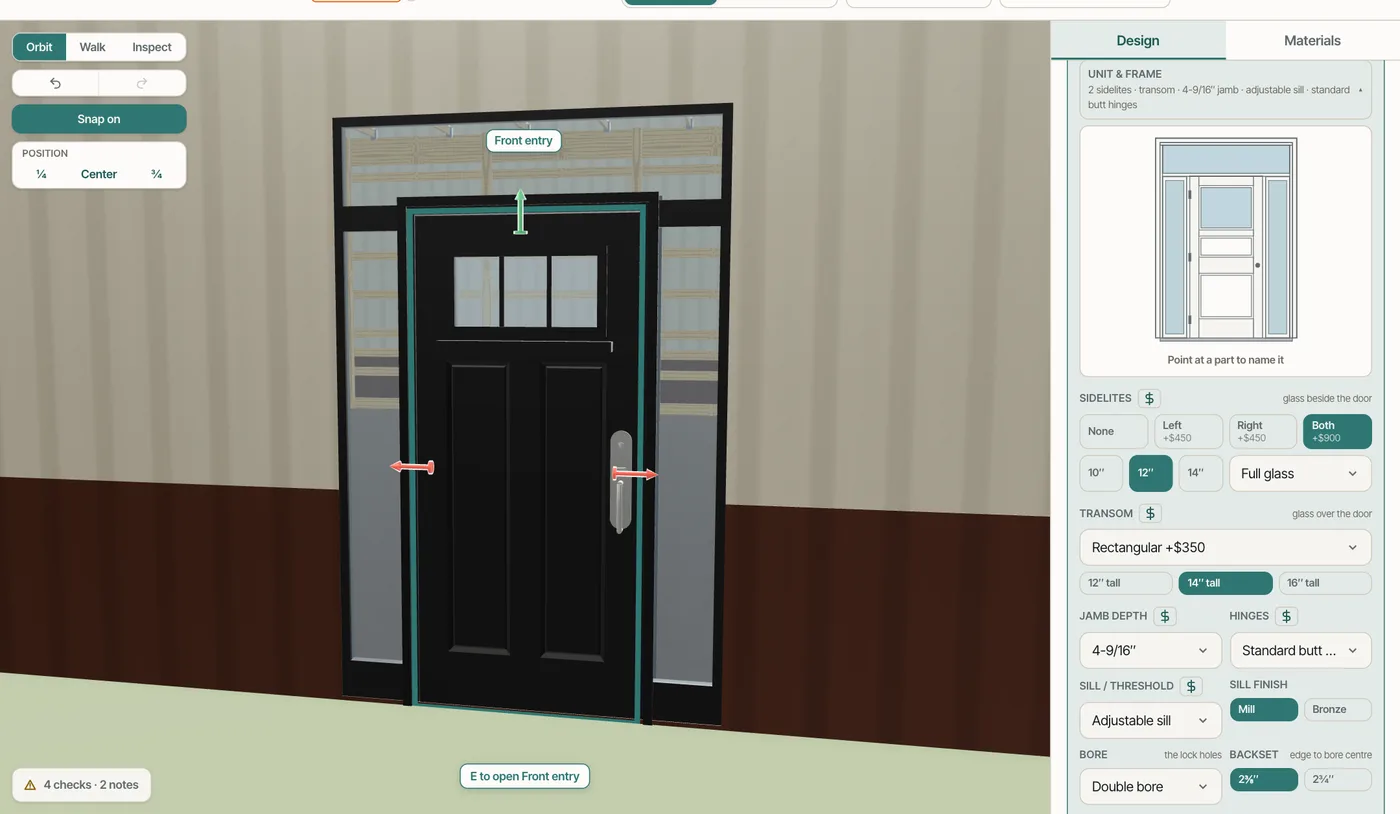
Sidelites, transoms and hardware get added after the quote is signed, at the builder's cost.
The entry door the customer is picturing is the one on the quote, with every piece of it priced.
A custom option, priced and visible
Every door choice — style, glass, handle and lock, colour — can take a Custom… option: your name for it, the supplier link (checked), a base price and this estimate's price, and how it should look on the model. The configurator shows it beside the standard choices with its upcharge, the same way the others show theirs.
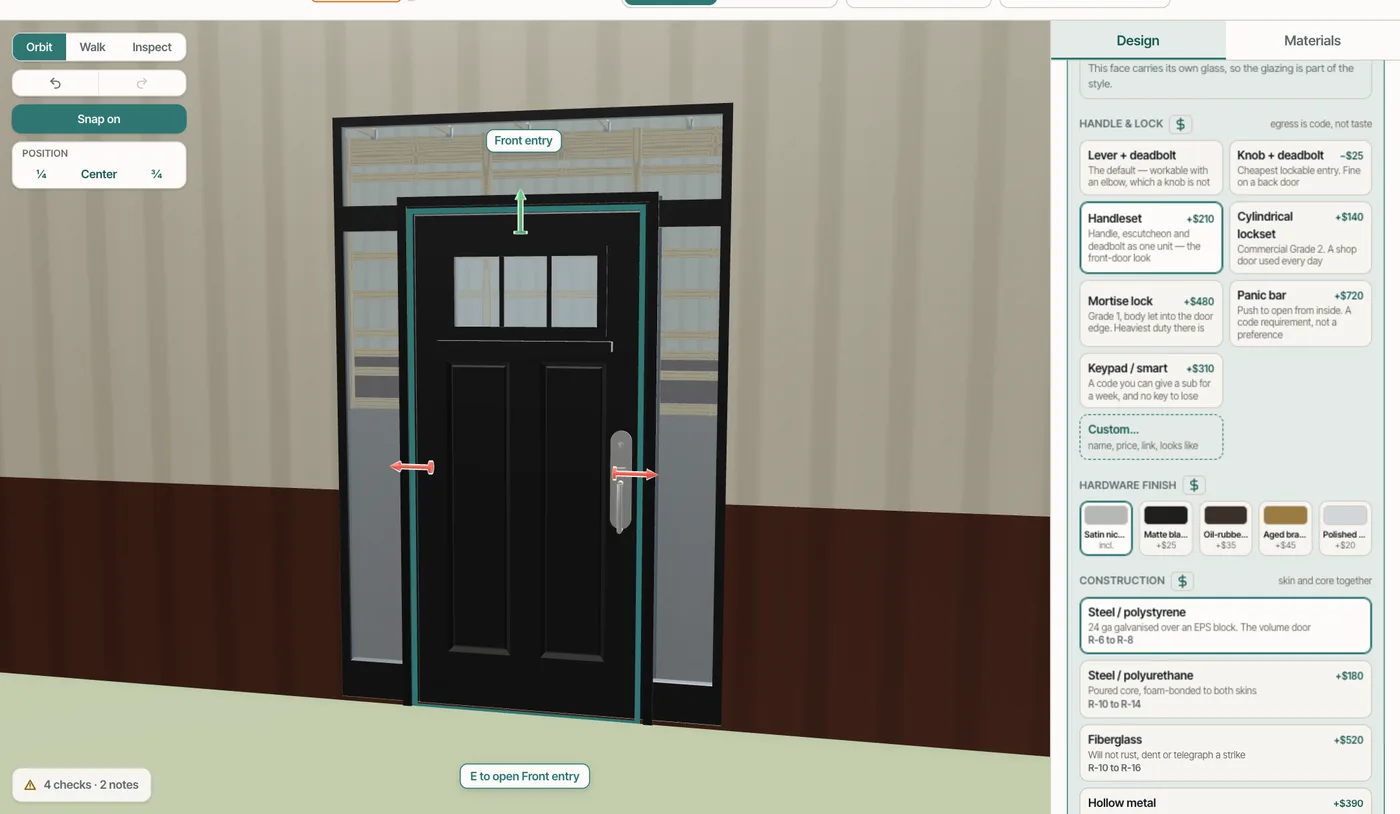
The handle the customer actually wants isn't on the list, so it becomes a sticky note — and an unbilled extra.
The odd request gets priced on the spot instead of becoming a note nobody bills.
Pull a garage door through to the other wall
Right-click a garage door and pull it through: the same door goes on the opposite wall, lined up and linked, so moving or resizing one moves the other. Unlink pull-through separates them. When big doors land in both endwalls, the design notes that the endwall shear needs the engineer's eye.
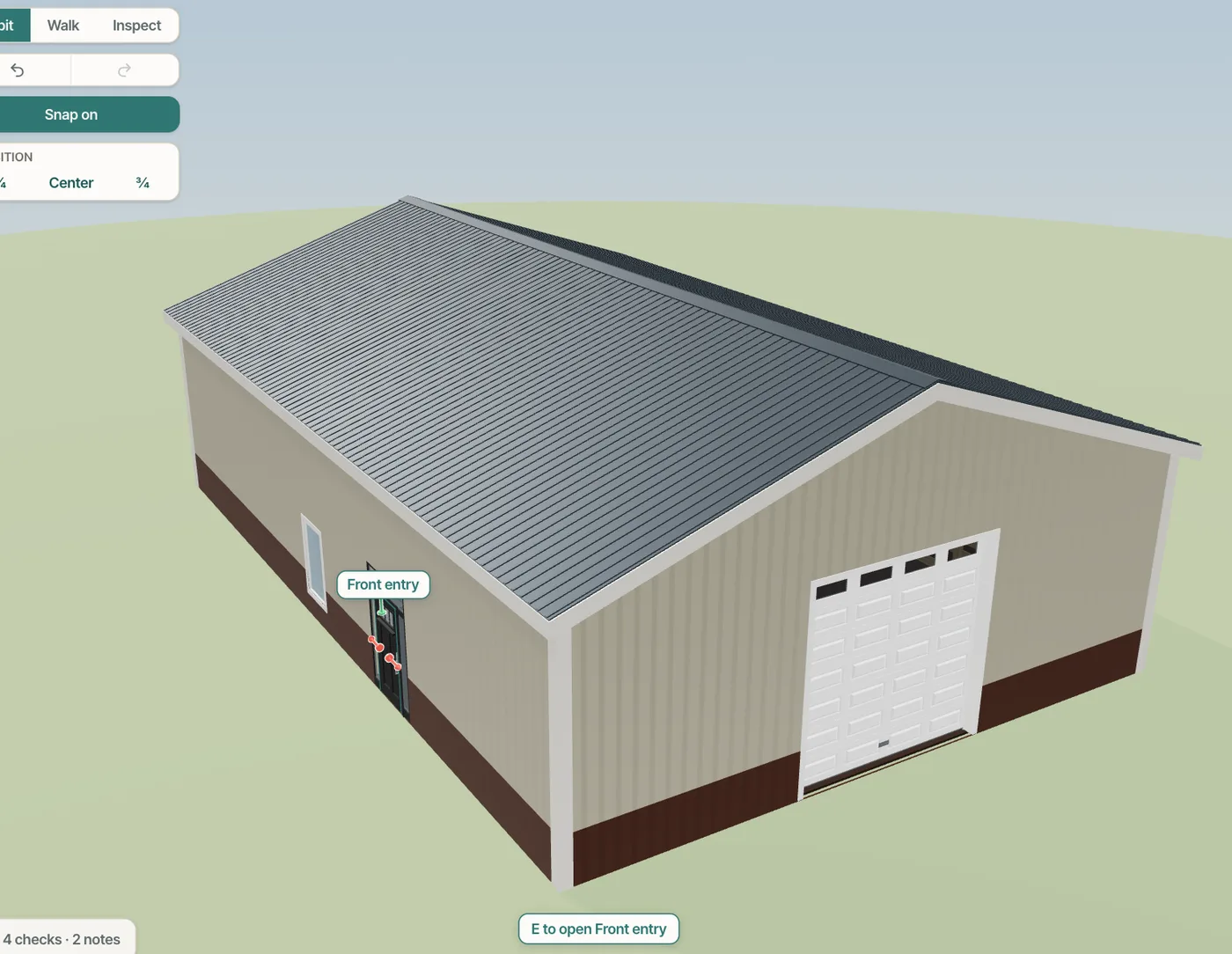
Two doors placed by hand for a drive-through bay end up a foot apart on the drawing and on the slab.
A drive-through bay is one decision, so it is one action — and the two doors can't drift apart.
Presets, defaults and centring on the right-click
Save as preset… names a configured door; a default for each kind — company-wide, or for this design only — is what a right-click on a wall drops. The same menu carries Change to (your list and presets), Center on wall and Center between openings.
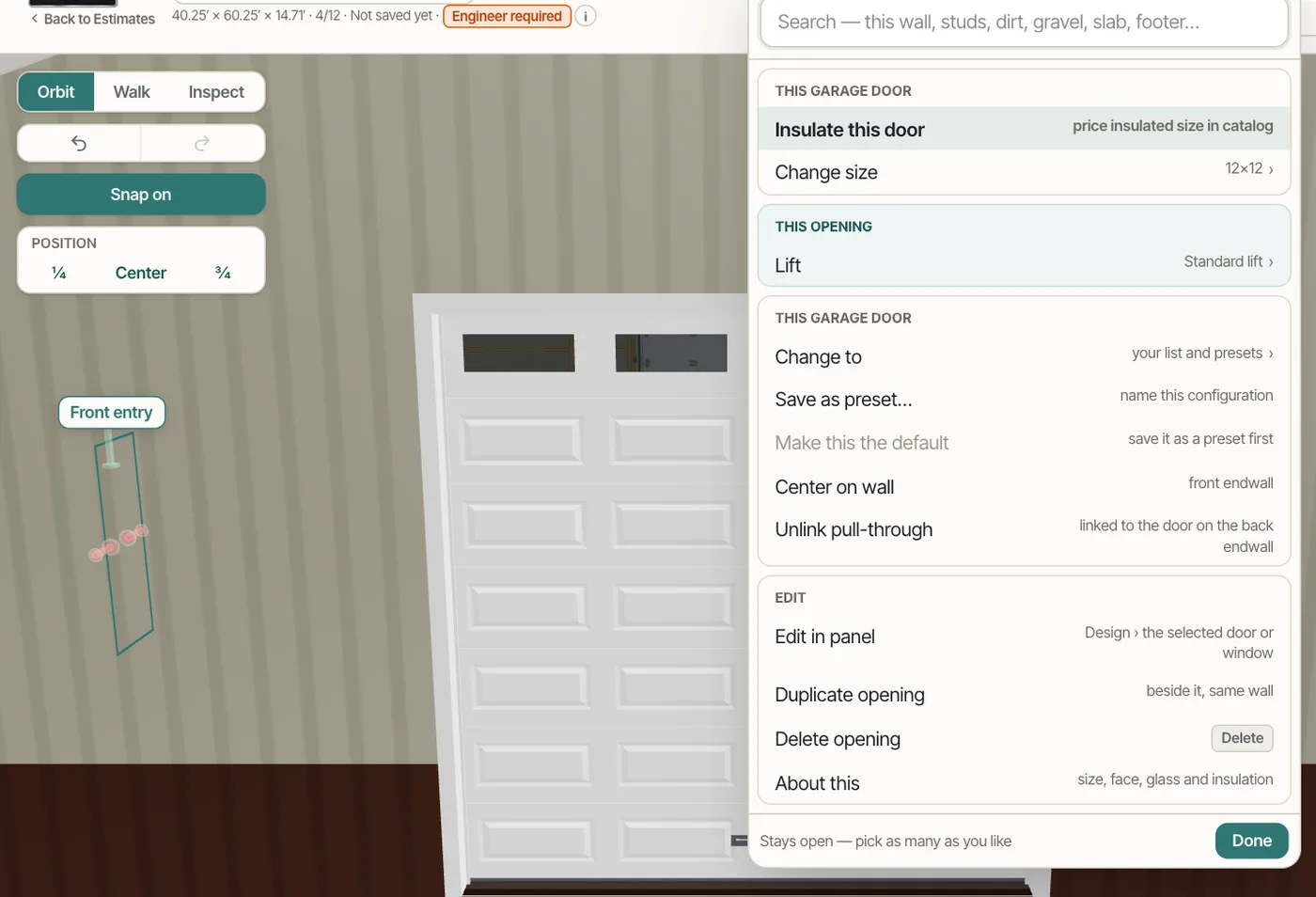
Every door starts as a generic one that has to be reconfigured, then nudged to the middle by eye.
The door you place most is one click, and centring a door never takes a tape measure.
- 1Turn on Opening catalogue, presets and custom options (and Company rough-opening rules) in Settings → Beta features. New accounts start with the catalogue on.
- 2Open Your windows & doors from the opening panel's list: one tab each for Windows, Walk-in doors, Garage doors, Sliding doors, Interior doors and Rough openings.
- 3Add your own with Custom… — name, size, supplier, product link, model, specs and price. Your list replaces the shipped sizes in the panel and on the right-click menu.
- 4Configure a door once and Save as preset; pick a Default for each kind so a right-click on a wall drops it straight away.
- 5Set the Rough openings rules; new designs are framed and scheduled that way, and Use on this design applies them to the one in front of you. Saved designs never change by themselves.
- 6On a walk door, open Unit & frame for the transom, sidelites, jamb, sill, hinges and the lock — or right-click the door for Sidelites & transom… or Unit & frame…. Press the + on the left, right or top of the door drawing to add a sidelite or a transom, − to take it off, and point at a part to name it. Sidelites, transoms, jamb depths, sills and hinge upgrades start at $0 — set your price: set yours once for the company, or for one job.
- 7Right-click a garage door for Center on wall, Center between openings or a pull-through to the opposite wall; Unlink pull-through separates them.
- 8The Academy's Your company's door and window standards lesson walks the Design defaults rows: company heights, the library switch and the rough-opening rules.
- 9Every configurator section folds to a header with its choice and price; they start closed, the ones you open stay open for you, and Expand all / Collapse all sit above them.
A builder does not sell "a window" — he sells the 3050 single-hung from his supplier at his price, framed at the rough opening his crew is used to. When the software only knows generic sizes, every quote starts with re-typing the same doors, the rough openings on the plan disagree with the ones the crew cuts, and the entry door with sidelites gets priced from memory. So the library holds what the company actually sells, the rough-opening rule is the company's own and shows what it produces, and a door is built from the parts a door maker lists — so the schedule, the framing and the order all describe the same opening.
- Re-entering the same window and door sizes on every quote
- Rough openings that disagree between the plan, the schedule and the framing
- Entry-door sidelites, transoms and hardware left off the price
- A supplier's product that the software has no place for
- Two garage doors in a drive-through bay that drift apart when one is moved