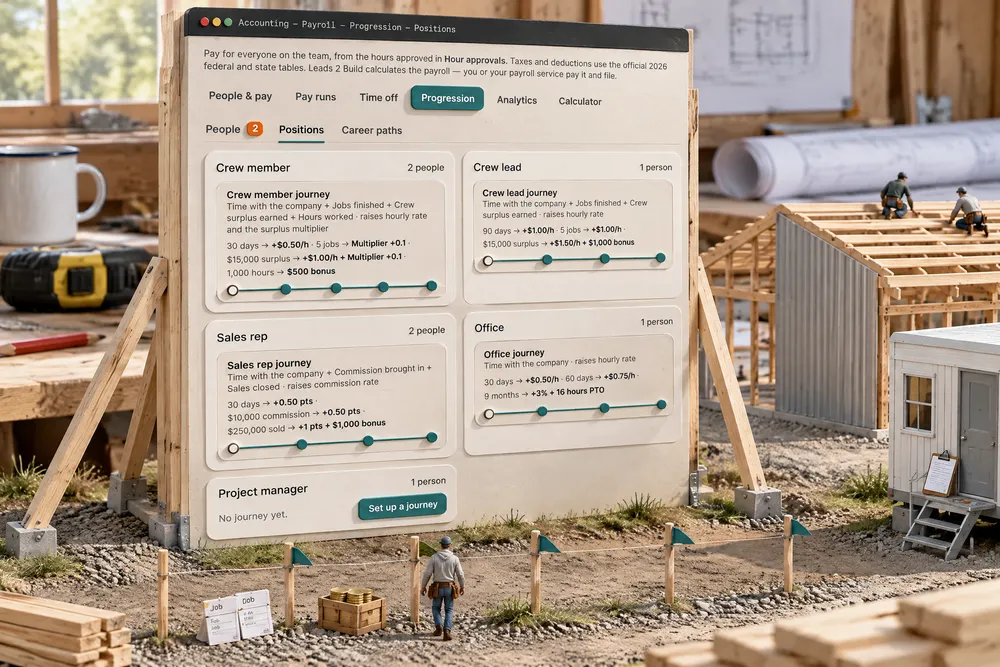
Two tabs in payroll progression. Positions holds each position's raise paths, drawn as a node timeline. The line into each step counts its own measure (calendar days or months, approved hours, jobs finished, crew surplus earned, commission brought in, sales closed), and each step gives any mix of an hourly, day-rate or salary raise, a bigger surplus multiplier, a commission rate raise, a $ bonus or PTO hours. A position can have more than one path (an hourly crew and a day-rate crew). People shows everyone grouped by position, each on their own path, with reached steps marked Due until someone gives or declines the raise. These paths move pay inside a position. The third tab, Career paths, moves people between positions, and a new position starts its own raise path. Built exclusively for post-frame and barndominium builders, where a crew member's pay should follow the jobs he finishes and the surplus his crew earns, not just the calendar.
Also called: raise path · raise schedule · employee raise schedule · pay progression · pay scale construction workers · step raises · progression · when do I get a raise · raise criteria · crew raise ladder · commission rate raise · surplus multiplier raise
People: everyone on their path, and who's due
Try itPeople groups the team by position and draws each person's path, filled to where they are. At Ridgeline, Cody Yoder's Five jobs step is Due: Give raise reads Surplus multiplier 1.0 → 1.1, for every job settled from today. Sam Decker's commission step is due too, and Wes Brubaker's path shows paused until Oct 18, 2026 after a filed report (see progression strikes). A raise is backdated to the day the step was reached and the back pay for work already paid at the old rate goes on the next pay run. A multiplier counts from the next job settled, because surplus already split would come out of the rest of the crew's share. Decline records why, and Reopen brings it back. Pay never changes by itself.
A raise that was due in March and given in June is three months of back pay, and an employee who's sure you forgot.
A reached step that tells the approver, and a raise dated to the day it was earned, means nobody has to ask and nobody loses for the days it sat waiting.
Positions: each step measured by what the job is about
Try itPositions is where the paths are built. Ridgeline's crew member path starts at $22 an hour: 30 days → +$0.50/h, 5 jobs finished → multiplier +0.1, $15,000 of crew surplus → +$1.00/h and multiplier +0.1, 1,000 hours → a $500 bonus. Open a journey and the preview under each node shows the pay it leads to: $22.50, a 1.1 share, $23.50 and 1.2, then the bonus. A sales rep's path is a 30-day ramp, then $10,000 of commission, then $250,000 sold, each raising the commission rate. Click a line to change what it counts, a node to change its rewards. Which reward? beside each step shows what each reward drives (progression rewards), and each path says what a strike does to it.
A ladder that only counts months pays the man who shows up the same as the man who carries the crew.
A step a crew member can measure himself (jobs finished, surplus earned) tells him exactly what to push for, and the owner sees what the whole path costs before he promises it.
He sees his own path
Each person sees only their own path: on Home for the office and sales, and at the top of Your record in the crew app as My progression, with the rate now, what the next step gives and a bar of how far along they are (612 hours of 1,000 hours · 388 hours to go). When a step is reached, an amber line says the manager confirms the raise. When someone has reached every step, the next move is a new position, and Career paths shows what earns it.
"When's my next raise?" gets a vague answer, and a vague answer is how good hands start looking.
Progress you can see toward a goal you can measure is what makes people push for it, and the raise talk becomes a step on a path instead of a negotiation.
- 1Open Accounting → Payroll → Progression → Positions and Set up a journey for a position.
- 2Add steps. Over each line, pick what it counts: days or months, hours, jobs finished, crew surplus, commission or sales. Under each step, pick the rewards.
- 3The timeline previews the pay from where the position starts, so you see what the path costs before anyone is on it.
- 4Everyone in the position is on its first path unless their pay profile picks another. People shows each person's progress.
- 5A reached step turns Due and whoever approves raises is told. Give raise backdates it to the day it was reached and puts the back pay on the next pay run. Decline records the reason; it can be reopened later.
- 6Each person sees their own path on Home and in the crew app as My progression.
Most builders have one raise policy: the man who asks gets one. That rewards whoever asks loudest, and a good hand who doesn't ask starts listening to the outfit down the road. A ladder that only counts months is better, but it can't reward what a post-frame crew is actually paid to do: finish jobs and beat the labor budget. So each step on a path counts what fits the position, and gives the reward that fits the step. The rewards do different jobs. A raise is paid whether tomorrow goes well or not, so it mostly buys staying: in a study of 5,143 employees, salary growth cut quits most among the best performers. A bigger share of the crew's surplus buys speed on every job. A bonus at a close finish line buys a push toward it. Which reward? beside each step says which is which (progression rewards). And no raise changes pay by itself: a reached step waits for a person to give it, backdated so nobody loses the days it sat waiting. This page is about pay inside a position. Moving up to crew lead or project manager is a separate decision with separate milestones, so it has its own page: Career paths.
- Raises handed out to whoever asks
- Ladders that only count months
- Due raises forgotten, then owed in back pay
- No written rule for commission rate raises