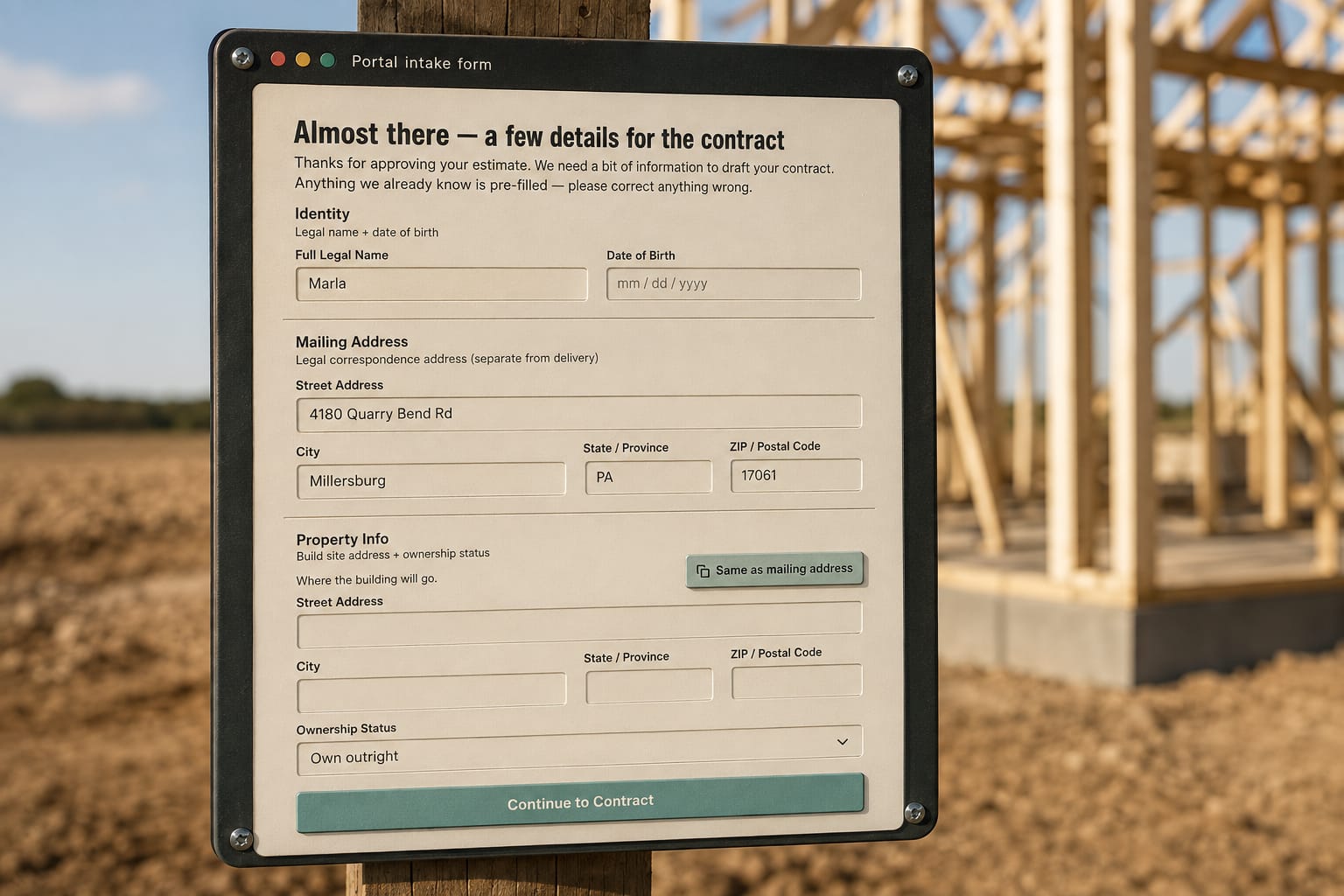
The short answer: A barndominium client questionnaire should reach the customer the moment they approve the estimate, on the same link, and collect what the contract needs that the estimate doesn't hold: legal names, mailing address, the build site, who owns the land, and permit and HOA status. The customer knows those answers and your office doesn't. Typed once by them, the answers write the agreement instead of being chased by phone.
The project questionnaire is the construction client intake form your customer fills in the moment they approve the quote, and its answers write the contract. Everything a post-frame agreement needs that the estimate does not already hold (legal name, mailing address, the build site, who owns the land, permit and HOA status) comes from the person who actually knows it, typed once, on the same link they just approved on.
The mechanics of the contract it produces live on the contracts that write themselves from the estimate page.
What does a project questionnaire hold?
It holds the facts a construction agreement needs that a quote never captures. A 40x60 shop quoted at $68,400 knows its posts, its trusses, its overhead doors and its price. It does not know that the buyer is "R & J Holdings LLC", that the mailing address is a PO box two towns over, or that the acreage is titled to the buyer's father.
| Field | Why the agreement needs it |
|---|---|
| Legal name | The party to the contract. "Randy" is not a party; the LLC on the deed is. |
| Mailing address | Where notices go if the job ever goes sideways. |
| Build site | The address the crew drives to, the schedule works from, and the site forecast is pulled for. |
| Ownership | Whether the person approving has the right to authorize work on that land. |
| Permits (optional section) | Who is pulling it and whether it is in hand, so the schedule does not start before the county says it can. |
| HOA (optional section) | Whether an association has to approve a 16-foot sidewall before you set a post. |
The pain is familiar: the deposit is in, the crew is booked, and the office is still texting "what's the legal name for the contract?" three days later. The Customer details form asks for exactly this list, and you decide which sections appear per job; a farm shop on the owner's own quarter section does not need an HOA block. When the office does have to chase, texting a customer from the business line keeps the answer on the job and not on a personal phone.
It works because the questionnaire is scoped to the contract. It does not ask for wall colour or door placement; those were settled on the quote. It asks only for what the agreement cannot be generated without.
Who produces it? The customer, not your office
The customer fills it in, from the link they approved on, pre-filled with whatever you already hold (name, phone, email from the lead). Your office does not re-key it.
That is the right author for two reasons. First, they are the only person who reliably knows the answers. Your sales rep does not know whether the property is held in a trust. Second, an answer typed by the customer is an answer the customer stands behind when it appears in the agreement they sign. A legal name your office guessed from an email signature is a defect in the contract; a legal name the customer typed is a fact they supplied.
The form is a stage of the customer portal, not a separate document. A thin rail across the top of every customer page names the four stages and which one they are on: Estimate, Your Details, Agreement, Live Project.
The rail exists because a customer who has just approved a price assumes the job is booked. Showing them that their details are the next step, and that the agreement follows, answers the "what happens now" call before it is made.
What does the questionnaire feed?
The agreement. Their details land and the contract is already assembled: legal name, build site, the approved total, the line items, the payment stages, the dates. Nothing is retyped between the questionnaire and the agreement, so nothing can drift. The number they approved is the number in the contract because there is no step where a person carries it across.
You still read it before it goes out. Review and Send puts the assembled agreement in front of you first, and you can fix a date or swap the template for this one job. But you are reviewing, not drafting. On a barndominium with a 30/60/10 draw schedule that is the difference between a contract that goes out the day they approve and one that goes out next week.
The build site answer does a second job. It decides which lien notice the agreement carries, since lien and notice rules follow the jurisdiction of the land, not the builder's office. It also becomes the address the crew's day and the site forecast are pulled for once the build starts. One typed address, three consumers. This whole path, from one link becoming the estimate, then the form, then the agreement, then the dashboard, is the Live Estimate System.
What changes once it exists?
- The contract is generated, not drafted. The template is yours; the facts are theirs; the assembly is automatic.
- One number carries. The approved total is the contract total. A separate proposal, quote and contract each typed by hand is how a job ends up with three prices; the questionnaire removes the retype where the second price usually appears. The proposal that wins the job still has to be built right upstream; the questionnaire only guarantees it survives the handoff.
- Permits are on the record before the schedule exists. Whether the customer or you are pulling the permit is answered before a start date is promised. Your county building department enforces the building code the International Code Council publishes, and a post-frame permit review can take longer than the framing; knowing who owns that wait belongs in the file, not in someone's memory.
- The dashboard opens on the same link. After counter-signature and Start Project, the address the customer bookmarked becomes their live project dashboard. The questionnaire is why that link already knows the site, the parties and the schedule.
If you are still deciding whether a system like this fits a two-crew shop, the list sorted by who it fits sets out where the questionnaire-to-contract path earns its keep and where a simpler tool is enough.
Who is it not for, and where does it stop?
It is not for a builder who sells kits to other builders and never signs a construction agreement with an end customer. That buyer has a purchase order, not a build site with an ownership question.
It also stops short of verification. The questionnaire records that the customer says the land is theirs; it does not run a title search. It records permit status; it does not pull the permit. It records that an HOA exists; the approval letter is still the customer's to obtain. Treat the answers as the customer's statements, which is exactly what a contract needs them to be, and do your own diligence where the job warrants it.
What the research says
- A small yes makes the next yes easier. Freedman and Fraser's experiments found that people who agreed to a modest first request were more likely to agree to a larger one later, even when a different person made it. A short questionnaire filled in right after approval is that small first step, and it carries the customer toward the signed contract while the decision is fresh.
- Details about the land only count once they're written down. In Hansen Pole Buildings' easement case, the county approved the permit after three meetings, but after the posts went in an irrigation inspector found the building 8 feet onto a canal easement, and the verbal OK was worthless. Asking who owns the land and what easements and permits apply, in writing from the customer, puts that on record before the first hole is dug.
- Contracts have to carry specific details. New York General Business Law §771 requires home improvement contracts to be written and signed and to include the work description, materials, schedule, progress payments and a three-day cancellation notice. Rules vary by state and may not cover a new barndo home, but the list shows why the names, address and site on the agreement have to be right.
- Chasing details by phone costs both sides. Mark, Gudith and Klocke found that interrupted people finished their work faster but reported more stress, frustration, time pressure and effort. Every call to ask a customer for a legal name or a parcel address is an interruption on both ends of the line; a form they fill in once is not.
Checklist before you turn it on
- Decide which sections appear by default: legal name, address, site and ownership always; permits and HOA per building type.
- Put your own contract template behind it, so the facts land in your clauses, not a generic form.
- Set the payment-stage presets you actually use (30/60/10, 50/50, four draws) so the right schedule lands without being chosen.
- Read the first three generated agreements line by line before you trust Review and Send to be a glance.
One thing this does not solve: a customer who approves on the phone and never opens the link. The questionnaire cannot be filled by someone who is not on the page, and a contract cannot be generated without it. For that customer the answer is still a call, and then the link.