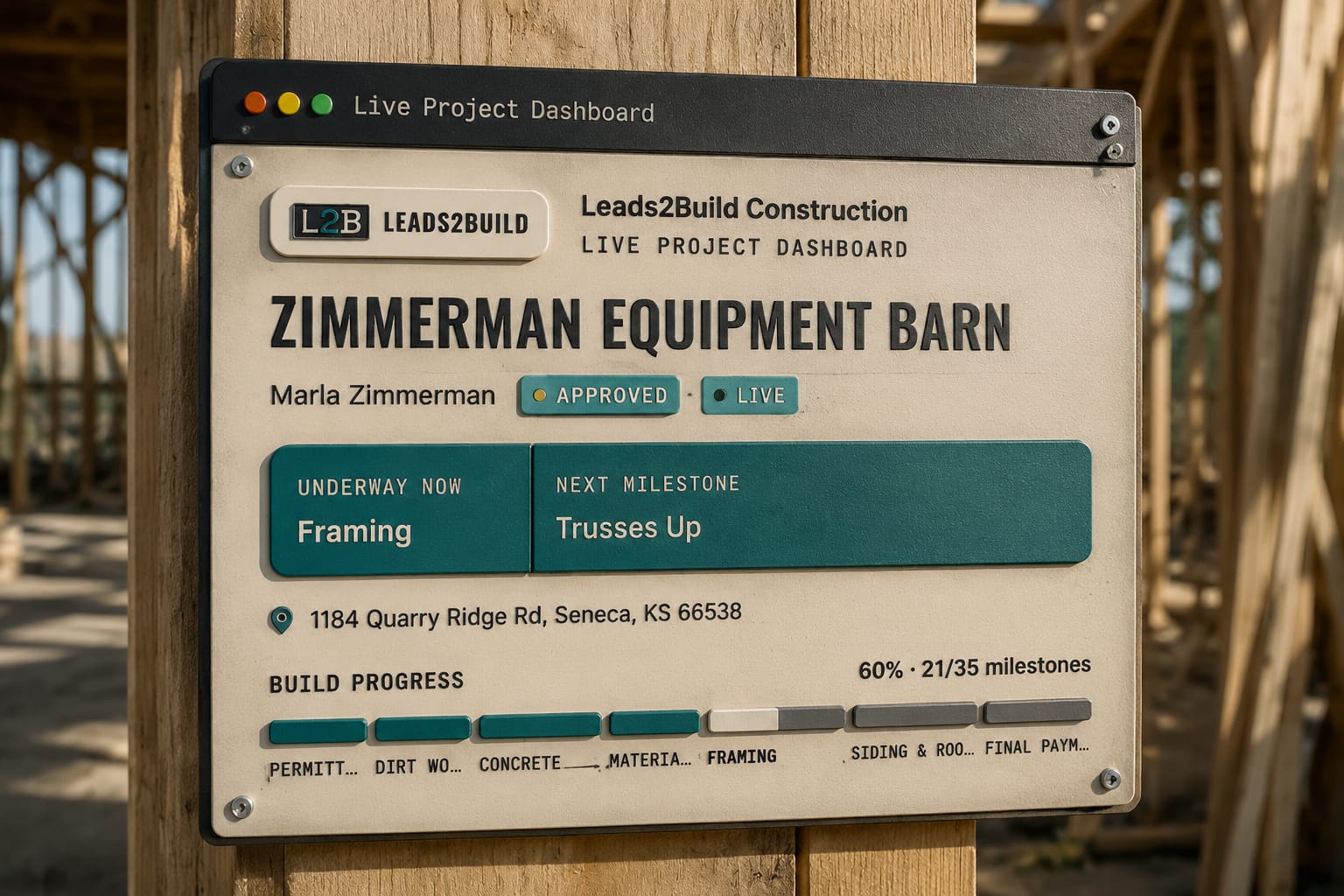
The short answer: A barndominium client portal should be one page per build, at the same link the customer approved the estimate on, showing what is done, what is next, what they owe and every document. It has to be fed by the job record, not written by hand, so it stays true without anyone updating it, and the "how's it going?" call has its answer before it is made.
Every "how's it going out there?" call is labour you already sold once and are now giving away. A live project dashboard is the part of a construction client portal that answers that call before it is made: the customer's own page for their build, at the link they already used to approve the quote, showing what is done, what is next, what they owe and every document they will ever ask you for. Nobody writes it. It is the job record, seen from the customer's side.
The mechanics of the page itself live on the live project dashboard feature page.
What a live project dashboard is, and what people confuse it with
A live project dashboard is a read-only view of the job record, served to the customer at one link. It is not a status email, a shared photo folder, or a client login. The difference is who does the work of keeping it true.
| Status email | Shared folder | Live project dashboard | |
|---|---|---|---|
| Who updates it | The PM, on Friday, if there is time | Whoever remembers to drop files in | The crew, by ticking the work in the field |
| Current as of | The last time somebody wrote one | The last upload | The last checkpoint ticked |
| Money owed | Not on it | Not on it | Outstanding total at the top, paid invoices folded away |
| When scope changes | A new email, if it gets written | Nothing | The signed change order lands on the page with its cost and days |
| Password | No | Usually | No, the link is the key |
A page the office has to feed is a newsletter. A page that moves because a crew lead ticked "purlins on" from the roof is a dashboard.
Why it has to be the same link as the quote
The customer approved a 40x60 shop with 14-foot walls and a 12-foot lean-to from a page on your domain, filled in their details there, signed the agreement there, and now, while the posts are going in, the same page shows the building going up. No second address, no invitation email, no password. The customer portal is one link from first quote to final invoice; the dashboard is what that link becomes after you press Start Project.
The building on the page is the one they approved, in 3D, in the colours that were priced. Customers do not ring to ask whether the wainscot is still burnished slate when they can turn the model and look.

What the customer actually opens the page for
They open it for four things, in this order: has anything moved, when is the next thing, what do I owe, and where is the document I need. A dashboard that answers those four kills the four calls behind them.
"Has anything moved" generates the most calls, because a customer who saw a slab last Tuesday and no trucks since assumes the job has stalled. A feed of completed milestones, each dated, shows Wednesday was trusses ordered and Thursday the delivery confirmed: progress nobody can see from a driveway.
The money question is the one that generates the awkward calls. A barndominium billed in six draws has five settled invoices and one open one, and the open one is the only thing the customer came to find. The card leads with the outstanding total, or "All paid in full", and the paid invoices fold away but stay one tap from the page because a paid invoice is a receipt, and receipts get asked for at tax time and by lenders mid-build.
Payments that get ahead of the work are the classic trigger for a consumer complaint against a builder. The California Contractors State License Board's consumer guidance makes that point directly. A page where the customer can see paid draws sitting beside ticked stages is the simplest defence there is.
Why the data is honest, and why that matters more than the page
The page is only as good as where its facts come from. On a live project dashboard the facts come from the job, not from a person summarising the job:
- Progress comes from checkpoints ticked inside each stage, by the office or by the crew lead on a phone, through the same save. The percentage is a count of ticked boxes, not a guess. That system is stage checkpoints.
- Photos come off the crew's phone, and only the ones sent with the "save and send to customer" button appear. The 6 a.m. mud stays in the job file. That is jobsite photos, with the destination named.
- Money comes from invoices you actually sent. Drafts never show; a deleted invoice is gone from their view too.
- Changes come from signed change orders, filed beside the original agreement. If you are still pricing extras on a handshake, read the construction change order that protects your margin first, because a dashboard cannot show a change that was never written down.
This is why the page must belong to the same contractor management software that runs the build, not a customer app bolted to the side. A bolted-on page needs feeding, and it goes stale the first week the PM is busy, which is every week. The same goes for a construction spreadsheet beside the job, which is true only as long as someone has time to feed it.
Who a live project dashboard fits, and who it does not
It fits a builder whose jobs run weeks to months with draws in between: a 40x60 shop over three weeks, a riding arena over six, a barndominium over five months with a lender involved. Long enough that the customer will wonder, and billed in enough pieces that they will lose track.
It fits a builder who sells to first-time post-frame owners. A family building their first barndominium does not know what "girts on" means, and a page with the picture, the date and the next stage teaches them without a phone call.
It is less useful for a kit supplier who delivers a package and never sets a post; the job ends at the yard. It is also less useful for a builder who bills entirely outside the system, though the invoices block can be switched off per customer, and the rest of the page still works. A builder with jobs of a single day and a single bill gains little.
What you keep control of
The page is composed per customer, not a fixed template. Turn the 3D viewer off for a farmer who will never orbit his hay barn; turn invoices off for the job billed through a lender's portal; hide the labour line without changing the total. It changes at any time, on the same link, with no resend.
Nothing appears until you press Start Project, so a customer who signed on Monday for a June start is not staring at a progress bar going nowhere for eight weeks. How the whole run from quote to dashboard hangs together is the Live Estimate System. If you are still choosing a platform, the contractor management software list sorted by who it fits covers where this kind of page is standard and where it is not.
What the research says
- People value work more when they can see it being done. In Buell, Kim and Tsay's experiments, customers who could watch the work perceived more effort and valued the service more; in their food-service field experiment, making the work visible (and letting cooks see customers) raised customer-reported quality 22.2% and cut throughput time 19.2%. A barndo owner who sees posts set, trusses up and the slab poured on his own page sees the effort he is paying for.
- Not knowing is its own stress. In de Berker and colleagues' experiment, people's reported stress, pupil size and skin response tracked how uncertain they were about what was coming. A family with its savings and a construction loan in a barndo calls because it can't see where the job stands; a page that shows the stage removes the uncertainty behind the call.
- Every status call lands on someone mid-task. Mark, Gudith and Klocke found that interrupted people finished faster but reported more stress, frustration, time pressure and effort. The owner on a roof or the office halfway through a draw request pays that cost each time the phone rings with "how's it going out there?"
- Communication is what separates customers who recommend you from those who don't. In GuildQuality data reported by Qualified Remodeler, communication scores showed the biggest gap between remodeling clients who would and wouldn't recommend their contractor. A live page is communication that happens whether or not anyone remembers to send an update.
Before you switch one on
- Confirm the crew is ticking checkpoints from the field, or the progress bar is the office's guess.
- Agree the two-button photo rule with every crew lead: one button to the job file, one to the customer.
- Set your payment schedule on the estimate so invoices come off it, not off memory.
- Decide per customer which blocks they see, and set a phone number so the page has one way to reach you.
- Press Start Project only when the start date is real.
One thing this page does not do: push. A customer who never opens their link will still ring, and the dashboard will not tell you they never looked the way estimate tracking tells you a quote sat unread. That call still gets made by a person, and knowing which customers to make it to is a separate problem.