A Permits & inspections card in the project window holds the job's permits — building, electrical, plumbing, mechanical, septic, driveway, well, zoning — with the permit number, jurisdiction, status, dates, fee and the permit card itself. Under them sit the inspections — footing, slab, underground plumbing, framing, the rough-ins, insulation, final, or one you name — each tied to its permit and to the schedule stage it signs off. Move one from requested to scheduled to passed or failed: a booked inspection shows on that stage's bar on the day the inspector comes; a failure asks what was flagged, tasks the job's project manager to book the reinspection and flags the stage. Post-frame and barndominiums, nobody else — so the list starts with the inspections your builds actually pass, in the order they pass them.
Also called: permit tracking · inspection tracking · schedule an inspection · failed inspection · reinspection · where do I keep the building permit · inspection scheduling · permit card on the job · book the reinspection · construction inspection tracking
Every permit on the job: number, status, fee and the card itself
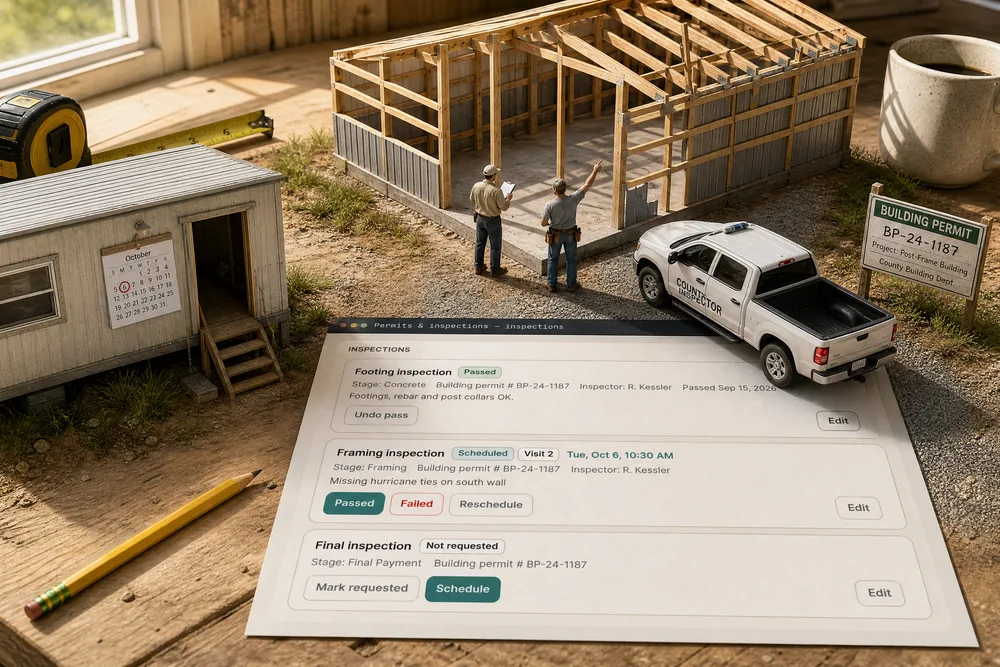
Dawson Hoover's shop carries two permits. Building permit · Approved · # BP-24-1187 — Ste. Genevieve County, the submitted, approved and expiry dates, Fee $485.00, and the permit card one click away. Electrical permit · Submitted · # E-24-0932, pulled by Summit Electric for the 200A service. Closed, the card's tag says 1 permit waiting.
The permit number is on a card taped in a truck window, and the fee is in somebody's email.
When the inspector or the bank asks for the permit number, the office answers from the job instead of the truck's glovebox. The owner sees which permits are still waiting before a crew is booked behind them.
Each inspection is tied to the stage it signs off
Try it+ Inspection asks the three things that matter: the inspection — footing, slab, underground plumbing, framing, the rough-ins, insulation, final, or one you name — Signs off the stage, picked from the job's own stages, and Under permit. Add the inspector and a report or photo; the file is also listed under Plans & documents.
An inspection on a clipboard has no idea which crew it is holding up.
The office links the paperwork to the work once, and from then on the schedule knows what each inspection holds up. That one link lets a failure flag Framing and a pass unlock Siding / Roofing — nobody has to remember the connection.
Inspections move one step at a time, and the next step is the button
Each inspection shows where it stands — Not requested, Requested, Scheduled, Passed, Failed, Reinspection — with its stage, its permit and the inspector. Only the next step is offered: Footing passed, with Undo pass if that was a slip; Framing booked for Tuesday at 10:30, Visit 2, with Passed · Failed · Reschedule; Final not asked for yet, with Mark requested · Schedule.
Nobody could say whether the final had been called in, or whether "framing passed" meant the first visit or the second.
The project manager never has to work out what to do next — the card hands it to him. Anyone glancing at the job sees in one look which inspections are done, which are booked and which nobody has called in yet.
Book the day — and it shows on the schedule
Schedule asks for the day the inspector is coming and, if the county gave you one, the time. It shows on the schedule on the Framing stage — a teal diamond above the bar on that day — and on the card's tag while it is closed.
The inspector showed up at ten and the crew had already closed the wall he came to see.
The crew lead sees Tuesday's inspection where he already looks, so the crew is there and the work is still open when the inspector pulls in. A missed inspection is a lost day for the whole job.
A failure asks what the inspector flagged
Failed opens one question: What did the inspector flag? Type it — Missing hurricane ties on south wall — and Record the failure. The note stays on the inspection, and the dialog says exactly what happens next.
The inspector told the foreman what was wrong; by the time it reached the office it was "something about the south wall".
Whoever took the inspector's call writes it down once, while they know it — not from memory on Friday. The crew gets the inspector's actual words, which is how they fix the right thing the first time.
The project manager gets a task to book the reinspection
Recording the failure puts one high-priority task on the job's project manager — Framing inspection failed — book the reinspection — due in a day, with the job, the stage and the inspector's note on it, and a notification to go with it. No project manager on the job? It goes to whoever is assigned, or to the person who recorded it. A second click on the same visit does not raise a second task.
Everybody heard the framing failed, and everybody assumed somebody else would rebook it.
A failure always lands on a named person with a due time, so the reinspection gets booked instead of sitting. The office stops chasing, and the owner stops finding out a week later that nobody called the county back.
The failure shows on the schedule, and the next stage stays locked
Try itThe stage the inspection signs off gets a red ! on its bar and beside its name — hover it: Framing inspection failed — reinspection needed. Once the reinspection is booked, its day shows as a diamond instead. Any stage set to wait on that inspection, like Siding / Roofing, stays locked until a reinspection passes — stages that wait is that rule.
Framing failed on Thursday and the schedule still showed it on track, with siding booked for Monday.
The project manager sees the failure on the same screen he schedules from, so the siding crew is not booked onto framing that has not passed. Nobody has to read an email to know the job has a problem.
A reinspection is visit 2, and every change is kept
Request reinspection turns the failure into visit 2; schedule it and record the result the same way. Click the inspection's name and its history opens — every status, the visit it belonged to, who set it, when, and what the inspector flagged.
Asked why framing ran a week over, all the office had was "the inspector failed us at some point".
When a customer or a lender asks why framing took an extra week, the owner shows a dated trail instead of telling a story. Facts end those conversations quickly.
The first permit starts from what the sale already knew
Before the sale, the permit lookup worked out which office governs the address. On the job, an empty Permits & inspections card offers that back — From the deal: Ste. Genevieve County, MO, whether a permit is required and the department to call — plus any permit number the customer typed on the intake form, each with where it came from. Start a permit from this fills the form; nothing is copied without you.
The rep looked up the county to quote it; the project manager looked it up again to pull the permit.
The office never re-researches a county it already looked up to quote the job. And because it is offered rather than copied, what was true at quoting time gets a second look once the build is real.
One form for the permit and its paper
The permit form takes type, status, permit number, jurisdiction, the submitted, approved and expiry dates, fee and notes — and the permit document, which is also listed under Plans & documents, where it opens in the same viewer as the plans.
The approved permit was a photo on the office manager's phone, and its expiry date was nowhere.
The office files the permit once and it is there for the crew, the inspector and the closeout — no second copy to keep in step. The expiry date sits on the permit's row where anyone can read it.
Closed, the card shows the next visit and what is waiting
Folded, the card's tags say Framing · Tue, Oct 6, 10:30 AM and 1 permit waiting — or, the day an inspection fails, 1 failed inspection in red. Anyone signed in to the account can open it to see when the inspector is coming; only admins and project managers change it.
The crew called the office three times to ask when the inspector was coming.
The crew lead checks Tuesday's visit himself instead of phoning the office. The office keeps control of what the record says while everyone can read it.
- 1Press + Permit — the first one offers the county from the pre-sale permit check and any permit number the customer gave on the intake form.
- 2Attach the permit card; it is also listed with the job's Plans & documents.
- 3Press + Inspection, pick the inspection, its permit and the stage it signs off.
- 4Schedule it with the day and, if the county gave one, the time — it shows on that stage's bar.
- 5Failed asks what the inspector flagged, sends the job's project manager a task to book the reinspection, and flags the stage on the schedule.
- 6Request reinspection makes it visit 2; schedule it and record the result the same way.
- 7Every change is kept in the inspection's history. Everyone on the account can see the card; only admins and project managers change it.
The permit check answered whether a county wanted a permit before the sale, and the intake form asked the customer for the number — and then the job started and the permits and inspections lived on paper in a truck. A failed footing inspection was something the PM heard about by phone, the next stage got booked anyway, and nobody could say later which inspection passed when. Now the record sits on the job, and the schedule can see it.
- Permits and inspection results kept on paper, away from the job
- A failed inspection with nobody assigned to rebook it
- No link between an inspection and the stage it holds up
- Permit details looked up before the sale and retyped after it