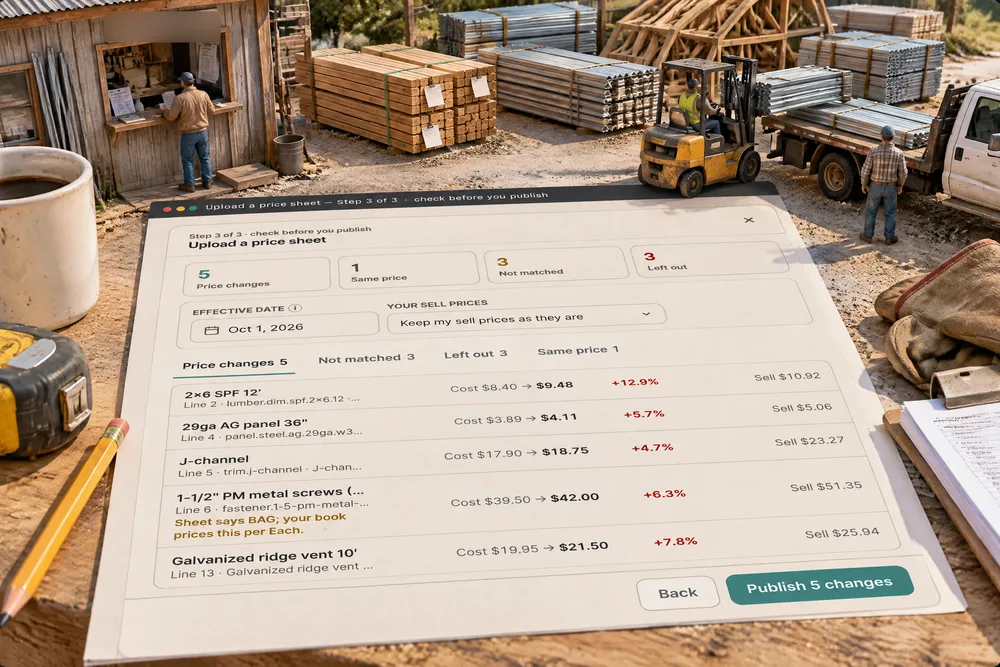
On Settings, Material prices, Upload price sheet takes the file your yard emails you, as it came: a CSV or the first sheet of an .xlsx, up to 5,000 rows. You tell it once which column is the SKU, the description, the unit and your cost, and the map is remembered for that supplier. The preview then shows every matched material with its cost before and after and the % change, the rows that matched nothing — match each to a product or add it as new, remembered next time — and the rows left out, each with the reason. Nothing changes until you publish, and every change lands in the Price change log with the old price, who published it, when, the file and the date the price took effect. Built only for post-frame and barndominium builders, so the list it updates is already in the trade's own products — 2x6 SPF, 29ga AG panel, J-channel, trusses.
Also called: import price list · yard price sheet · bulk price update · price list csv · excel price import · supplier price list upload · lumber price update · update material prices
The yard's sheet goes where your prices live
Upload price sheet and Price change log sit at the top of Settings, Material prices, above the list they change — every material with your cost, your sell price, the markup and margin between them, and a History button on each row. There is no import screen to find somewhere else. The prices you set by hand and the prices a sheet sets live in the same list, side by side with the rest of your price book.
The new list arrives from the yard, and the only way to get it into the book is to open the book and start typing.
An office manager updates prices in the place she already looks at prices — a second import screen is one more thing to forget. For the owner, one list means one answer to "what does 2x6 cost us right now".
CSV or Excel, as the yard sent it
Name the Supplier and drop the file: a CSV or an Excel .xlsx, first sheet, up to 5,000 rows. It counts the rows and columns before you go further — Menards — Oct price sheet.csv, 12 rows · 4 columns. An older .xls asks to be saved as .xlsx or CSV first, and a sheet with no rows under its header says so instead of pretending to work. Suppliers you have uploaded before sit under the box as one-click names.
The software wants its own template, so somebody copies the yard's columns into it by hand — which is the typing you were trying to avoid.
Nobody wants to reformat the yard's file before they can use it. Taking it as it arrives is the whole difference between an upload that saves an evening and one that costs one. For the business, a monthly update that takes minutes actually gets done every month.
Tell it once which column is which
Try itFive fields — SKU / item number, Description, Unit, Price (your cost) and Supplier — each pointed at a column, with the first three values from that column beside it, so a wrong pick is obvious before anything is read. Common headings are picked for you: on the Menards sheet Item #, Description, UOM and Net Price map themselves. Only the price is required, and the window warns when neither a SKU nor a description is mapped, because then no row can find its material. The map is saved by column name for that supplier, so next month's sheet maps itself even if the yard moves a column.
One shifted column and every material in the book takes its new cost from the unit-of-measure column.
Seeing "9.48 · 5.12 · 4.11" beside Price (your cost) is how you know it's the right column — before a whole list of costs is written into the wrong field. Remembering the map means the builder does this once per yard, not once per month.
Every change, old beside new, before anything is saved
The preview counts the sheet four ways — 5 price changes, 1 same price, 3 not matched, 3 left out on the October sheet — and lists every change with its cost before and after and the % change: 2x6 SPF 12′, $8.40 → $9.48, +12.9%. A row that matched by name instead of SKU says so. A unit that disagrees is flagged and never blocking: "Sheet says BAG; your book prices this per Each." — the screws, priced by the bag of 250 on the sheet and by the each in your list. Nothing has been written yet.
A bulk import that just overwrites prices tells you nothing until a quote comes out strange and somebody goes looking.
Old beside new is how a builder spots the one price that jumped 40% while it is still a line on a screen. The unit warning catches the mistake that does the most damage quietly — a bag price landing as an each price — before it is a price anybody relies on.
The yard's item numbers, matched once and remembered
Try itA row finds its material by a match you made before for that supplier, by SKU, or by the material's name. The ones that find nothing land under Not matched, each with its price and unit, and three choices: Leave out, Match to a product… — a search across your own products and the catalogue — or Add as a new product. Match MEN-778812 Simpson LUS26 joist hanger to your Joist hanger LUS26 once, and next month's Menards sheet matches that row by itself.
Half the yard's sheet uses its own codes, so half of it either gets ignored or gets matched by guesswork every single month.
Every yard has its own item numbers, and none of them are yours. Deciding once per SKU — and having the decision remembered — means the sheet gets more automatic every month instead of asking the same question forever.
Rows left out, with the reason
Some rows should never become a price. A zero is left out, because a blank on a supplier sheet is not free. A word where the price should be — "Call" — is left out. The same SKU twice keeps the first and leaves out the second, and two rows pricing the same material keep one. So do a negative price, a price over $1,000,000 (usually a wrong column) and a row with neither a SKU nor a description. Each one is listed under Left out with its line number and the reason.
A "Call for price" or a blank cell gets imported as $0, and a material quietly costs nothing until somebody orders it.
A row left out with its reason is safer than a row guessed at. The office can phone the yard about the special-order door instead of discovering later that it went into the list at $0.
Keep your sell price, or keep your markup
Try itCost is what the sheet carries; what you sell for is your decision. Your sell prices offers two answers: Keep my sell prices as they are, or Move sell with cost (keep my markup %). Switch it and the Sell column on every row shows what will happen — 2x6 SPF 12′ stays at $10.92, or moves to $12.324 to hold its 30%. Margin on each material is shown in the price book, and the markup on a job is its own setting.
Cost goes up and sell stays put, so the margin on that material shrinks a little every month and nobody decided it should.
An owner who raises costs without raising sell has just cut his own margin, and one who moves both without being asked has repriced his customers. Asking the question, with the answer shown per row, keeps that decision with the person who owns it.
Nothing moves until you say Publish
Publish opens a confirm that says the whole change in one sentence: 5 costs change in your price book, 1 matched by hand, 1 new product, the effective date, whether sell prices move, and that every change is logged with its old price. The Effective date is the day the prices start — it is recorded on every change and in each material's history — and it cannot be in the future, because publishing applies the prices now.
One click that rewrites a whole price list is one click too easy, especially on the wrong supplier's file.
The last thing read before hundreds of prices move should be what is about to happen, in plain words. A confirm that counts the changes is the moment a wrong sheet gets caught — and a publish that is never accidental is one the office is not afraid to do.
One sentence says what changed
When the publish is done the window says it back: 6 prices changed, 1 new product added, 5 rows left out, and that every change is in the log with the old and new price, who published it and the file. See the change log opens that upload's changes directly. Publishing with nothing to change says that too — and still saves the column map for next time.
After a bulk update nobody can say what actually changed, so nobody trusts the list afterwards.
A result the office can repeat back is a result the owner trusts. "Six prices moved, one new product, five rows we left out" is a sentence somebody can say in a Monday meeting.
Every change on record: who, when, which file
Try itThe Price change log keeps every price a sheet changed: old and new cost, old and new sell, the % change, who published it, when, the supplier and its SKU, the file and the date the price took effect. Pick one upload to see only its changes, with a line saying who published it, when, and how many rows changed, were added or left out — or every upload together, newest first. Prices you type by hand are in each material's own history instead.
A price is wrong and nobody knows whether it came from the yard, a typo or last month's sheet.
A price list with a history is a list people are not afraid to update. When a number looks wrong, the owner can see the sheet it came from and who published it in seconds — and the office never has to defend a price from memory.
One material's whole price story
Every row in Material prices has a History: every cost and sell price that material has had, newest first, each with what it was before and who changed it. 2x6 SPF 12′ shows the October sheet at $9.48, was $8.40, a hand edit in August before it, and the price it started at. The list is written automatically, so a price cannot change anywhere — a sheet, a hand edit — without appearing here.
You can see today's price for 2x6 but not how it got there, so every question about last spring's numbers is a guess.
"When did 2x6 go up?" should take one click, not a search through emails from the yard. For the owner it is the long view: how a material has moved over a season, and whether the sell price kept up.
- 1Open Settings, Material prices and press Upload price sheet
- 2Name the Supplier — Menards, say — and drop the CSV or Excel file the yard sent
- 3Check the columns: SKU / item number, Description, Unit and Price (your cost), each shown with its first three values. Common headings are picked for you, and the supplier's next sheet maps itself
- 4Read the preview: Price changes, Not matched, Left out and Same price, with a count on each
- 5Match an unmatched row to a product you have, add it as a new product, or leave it out — a match is remembered for that supplier
- 6Pick the Effective date and whether your sell prices stay put or move with cost to keep your markup
- 7Publish behind a confirm that says exactly what will change
- 8Open the Price change log to see every price the sheet moved, or a material's own History to see every price it has had
Lumber and steel move every month, and the yard's answer is a spreadsheet: hundreds of lines, their item numbers, their units. Typing that into a price list is an evening, and the evening is where a price goes wrong — a 2x6 keyed as 94.80 instead of 9.48, a bag of screws priced as one screw. A one-step import is worse: one shifted column rewrites the whole list and nobody can say what it used to be. So the sheet is read and matched first, every change is shown old beside new, rows that can't be trusted are left out with the reason, and only an explicit publish moves a price — with the old one kept on record.
- Updating a whole material price list by hand
- Bulk imports that overwrite prices with no record
- Supplier SKUs that never line up with your own list
- A wrong column or a blank cell written into the list as a real price
- No answer to when a price changed, from which sheet, and who published it