A Subcontracts card in every project window. Each subcontract PO names the sub (with their insurance badge), the schedule stage it buys, the scope of work in words, lines tagged with cost codes, payment terms and drawings. Save & send to sub emails the sub a link — no login — where they read the same scope and price and accept or decline with their typed name. A sent PO counts as committed cost on the job's budget, by phase and by cost code; payments go against it by percent complete, through the insurance check, and never past what the PO is worth. It's made for the trades on a post-frame job — the slab, the framing, the rough-ins — on the same stages as your schedule.
Also called: subcontract · sub PO · subcontractor purchase order · cost codes · committed cost by trade · progress billing · sub agreement · percent complete billing · pay subs by draw · committed cost
Every sub on the job in one card
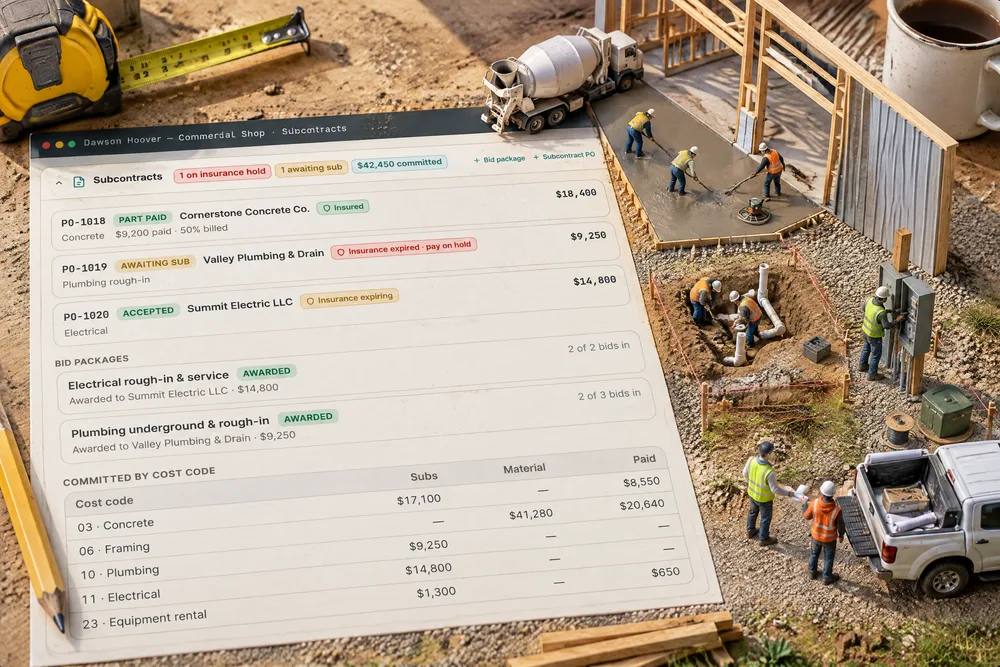
The Subcontracts card on Dawson Hoover — Commercial Shop lists each PO with its stage, the sub's answer, their insurance badge and what's been paid: Cornerstone Concrete Co. part paid on the slab, Valley Plumbing & Drain awaiting sub and on insurance hold, Summit Electric LLC accepted for the electrical. Closed, it still says 1 on insurance hold · 1 awaiting sub · $42,450 committed.
Who's hired for what, at what price and who's been paid lives in texts and a spreadsheet nobody updated.
The project manager sees what needs chasing without opening anything — so nothing waits a week for someone to notice. Problems sit on the closed card's header, where they can't be scrolled past.
The scope in writing, priced line by line with a cost code
A subcontract PO carries the scope of work in words, priced lines each tagged with a cost code, payment terms, a start date, a note to the sub, an internal memo only your team sees, and the drawings. PO-1020 to Summit Electric LLC is $14,800 in three lines under 11 · Electrical, with terms of 40% at service set, 60% at rough-in inspection and the floor plan attached. The bid award wrote most of it.
The price was agreed on the phone, the scope never got written down, and the argument starts at the final bill.
A scope in writing settles the argument before the first trench is dug — and the sub knows exactly what you're paying for. Pricing line by line with a trade on each is also what lets the job cost add up later.
Each PO buys a stage of the schedule
Schedule stage links the PO to one stage of the job — Electrical here. The PO then counts against that phase's committed cost on the budget, and a stage set to Needs a purchase order stays locked until a PO linked to it has been sent.
A sub's price that isn't tied to a stage shows up nowhere when you look at what that phase is costing.
The project manager runs the job by stages, so the money follows the stages he already watches. It's the same schedule your crews and customer see, not a second list.
The sub accepts from a link, with their name
Try itSave & send to sub emails a link — no login. The sub sees your company name, the PO number, the job and stage, the scope, every line with its trade, the total, the terms and the drawings. They type their name and press Accept $14,800.00, or Decline and say why. With no email on file you get the link to send yourself.
A sub says yes on the phone and remembers a different number when the bill comes.
A sub will answer a link on his phone between jobs; he won't log in to your software. A typed name against the written scope is an agreement both sides can point to.
You hear the moment the sub answers
When the sub answers from their link, admins and project managers get Sub answered a purchase order: Summit Electric LLC accepted PO-1020 — The subcontract is agreed. A decline brings the sub's reason, and the PO goes back to draft so you can revise it and send it again, or pick another sub.
You send a PO and then keep checking your email to see whether the sub replied.
The answer comes to the project manager instead of him going to look for it. A decline that reopens the draft turns a no into the next move, not a dead end.
What the sub accepted stays what they accepted
Once a PO is sent, its scope and price lock — they're what the sub is answering. The PO shows when the sub opened it and what they said — Accepted by Dale Summers · 9/26/2026 — with the sub's link on hand to send again.
Someone edits the PO after the sub agreed, and now nobody knows which version he said yes to.
Both sides can trust the paper because neither side can quietly change it. The office sees opened and answered without phoning the sub.
Committed cost adds up by trade
Try itCost codes — the trades a job's cost is sorted by — start as construction defaults, 01 General conditions to 24 Cleanup & dumpsters. Every PO line, material or sub, can carry one, so the Subcontracts card and the Budget & margin card add committed cost up by trade. Rename a code, add your own or switch one off; old lines keep their label.
Every job's costs are sorted differently, so you can't tell what framing cost on this shop against the last one.
The same trades on every job let an owner compare jobs instead of guessing. The codes start ready to use, so nobody has to build a chart of accounts before the first PO.
Pay as the work gets done — never more than the PO
Try itCornerstone Concrete Co.'s slab PO is $18,400, with $9,200 paid at forms. Enter 100% complete and the amount fills in as the rest owed; Pay the balance does the same in one tap. A payment can never be more than what's left on the PO, and the PO reads Part paid, then Paid.
Paying a sub in draws turns into arithmetic on a sticky note — and once in a while, paying twice.
The sub gets paid as he progresses, and the office can't overpay with a typo. Percent complete is how subs bill, so the screen speaks their language.
Every payment goes through the insurance check
Try itIf you've switched on the insurance hold, a payment to a sub whose required cover is missing or expired is refused with the reason — Valley Plumbing & Drain's PO-1019 reads Payment on hold — insurance. An admin can pay through it by writing why.
The PO was approved, the work was done, and nobody noticed the sub's comp ran out last month.
The check happens where the money goes out, so nobody has to remember it. It's the same rule on every PO, with one documented way through.
The sub's bill on the PO — and into QuickBooks if you switch it on
When the sub's bill arrives, Record the sub's bill on the PO. With QuickBooks bills switched on in Settings — it's off until you turn it on — an accepted PO goes to QuickBooks as a bill to that vendor against the job, one line per cost code, and the payments you record go across as bill payments.
The sub's bill gets retyped into the books by hand, against the wrong job, a week late.
The bookkeeper stops retyping what the PO already says. It's off until switched on, so nothing reaches your books until you've chosen the accounts.
Cancel with a reason — the link dies, the commitment comes off
Try itPlans change. Cancel PO asks why — the reason is required — then stops the sub's link working and takes the PO out of committed cost. It's offered only while nothing has been paid against the PO.
A scope you pulled still shows as money committed, and the sub can still open the PO.
A pulled scope should stop costing you on paper the moment you pull it. The reason means anyone can see later why it went.
Or let a bid award raise it
Put the scope out to several subs first and Award raises the subcontract PO as a draft — the package's scope, the winning price or line breakdown, the stage and the drawings — with the bid recorded in the internal memo. See bid packages.
The winning bid gets retyped into a PO and comes out a few hundred dollars different.
The PO says exactly what the sub bid, because nobody retyped it. The project manager goes straight from choosing a sub to sending the PO.
- 1Open the job and, on the Subcontracts card, press Subcontract PO — or let a bid award raise it for you.
- 2Pick the sub and the schedule stage, write the scope, add priced lines with a cost code each, the terms and the drawings.
- 3Save & send to sub — they get a link with no login. No email on file, and you get the link to send yourself.
- 4The sub accepts or declines with their name; a decline asks why and puts the PO back to draft. You're notified either way.
- 5Once sent, the scope and price lock, and the PO counts as committed cost by phase and by cost code.
- 6Pay as the work goes: enter % complete and the amount fills in, or pay the balance — every payment goes through the insurance check.
- 7Cost codes start as construction defaults; rename them, add your own or switch them off in Settings → Subs & Purchasing.
- 8With QuickBooks bills switched on, an accepted PO goes to QuickBooks as a bill against the job, one line per cost code.
Subs were hired on a phone call and a text. There was no record of the scope or the price they'd agreed to, the job's committed cost by trade was guesswork until the bills arrived, and progress payments were worked out on the back of an envelope. So a sub's work became a purchase order like any other: a written scope, priced lines with a trade on each, a link the sub answers with their name, and payments that add up against it — on the same stages the schedule runs on.
- Sub scope and price agreed with no written record
- Committed cost by trade unknown until bills arrive
- Progress payments worked out by hand, with nothing stopping an overpayment
- A pulled scope still counted as money committed