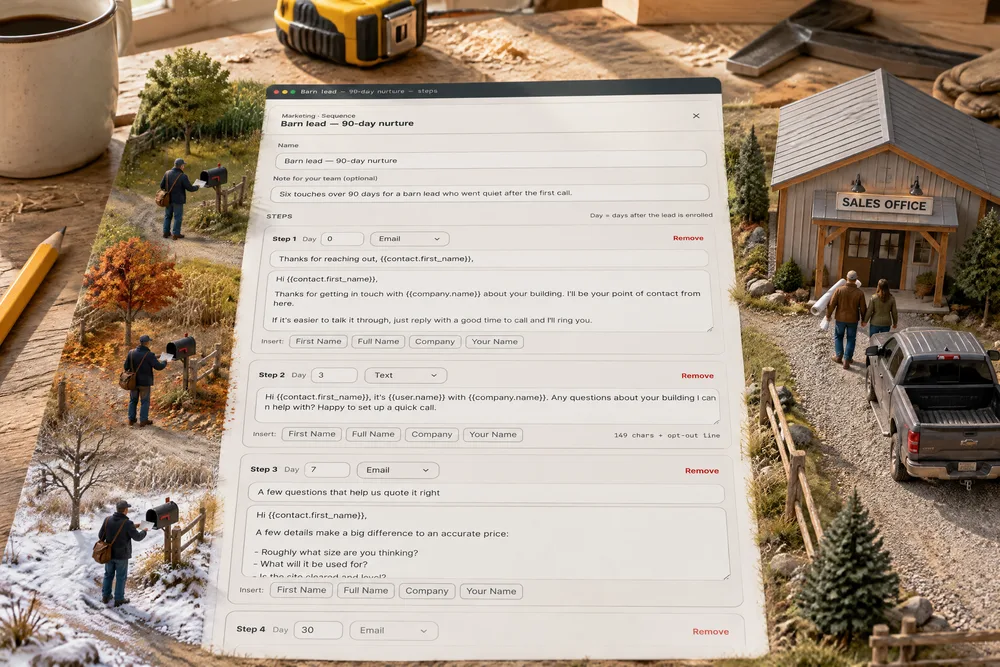
Marketing → Sequences holds your follow-up runs. Each is a list of steps — an email or a text, on a set day after the lead joins — written in your own words, with their first name, your company and the rep's name filled in. Choose who joins: leads entering a stage, new leads from a source like Facebook or your website form, or anyone you add from their card. Messages go out only inside your send window, in the lead's own time zone. A reply, a booking or a stage move ends the run for that lead; an unsubscribe ends every sequence for them, for good. A new sequence is a draft, and nothing sends until you press Activate. Each one keeps score: enrolled, sent, opened, replied, booked, stopped. Post-frame and barndominiums, nobody else — a building buyer can take months to decide, and this is follow-up paced for that.
Also called: drip campaign · nurture emails · automatic follow-up · follow-up sequence · email and text cadence · nurture campaign · automated texts to leads · lead follow-up automation
Write your follow-up once, in your own words
Try itEach step is a Day, Email or Text, a subject for emails and the message. Insert drops in the lead's first or full name, your company and the rep's name — so Marlin Esh's day-0 email opens "Hi Marlin" and is signed by Wade Kessler. The 90-day starter is six steps: a thank-you the same day, a text on day 3, a few quoting questions on day 7, check-ins at 30 and 60, and "Should I close your file?" at 90. Every word is yours to change.
You mean to check in with every quote at 30 and 60 days, and by day 30 you're pouring a slab and it never happens.
A builder will send follow-up he wrote himself; he won't send a canned blast. Writing it once, in the voice he'd use on the phone, means the check-in at day 60 actually happens — and sounds like him when it does.
Nothing sends until you press Activate
A new sequence is Draft — not sending, and saving it never starts it. The card says what it is in one line — 6 steps · over 90 days · 4 emails · 2 texts — and who it enrols, with Activate beside Edit. Your account's own messaging switches still apply on top.
You're wary of automatic follow-up because the last tool started emailing customers while you were still writing it.
Turning on automation is nerve-racking when you're not sure what it'll send, or to whom. Making "start sending" its own button, apart from Save, means you can write, rewrite and leave a sequence for a week without a single customer hearing from it.
The confirmation says exactly what will happen
Activate asks first, and the question is written from the sequence itself: who it enrols, how many steps go to real customers by email and text, between which hours in their time, and what stops it. Confirm, and due steps go out on the next run.
You press Activate on a tool and only find out what it does when a customer calls about the message he just got.
People trust automation they can read before it runs. One plain paragraph about what's about to happen takes the guesswork out of the riskiest click on the page.
Leads join by stage, by source, or by hand
Try itUnder Who gets enrolled, pick the stages that put a lead in when they enter them — New Lead here — and the sources that enrol a brand-new lead — Facebook and Website form. Anyone else can be added from their card. A lead joins a sequence automatically only once, and demo and test records never do. The stages are your sales pipeline's own.
Every lead gets the same follow-up — or none — because there's no way to say which leads a run is for.
The right follow-up depends on where a lead came from and where they've got to. A Facebook lead nobody has called yet and a lead with an estimate in hand need different words, so each sequence picks its own doors.
It stops itself the moment they answer
Try itThey reply — a text or email back ends the run. They book — a meeting, site visit or call task on their card, or Booked — stop on the card. They move stage — moving the card anywhere else ends it. Unsubscribing always stops every sequence for that lead; that one isn't a setting. And right before each step goes out, all of these are checked again.
A customer replies "we went with someone else", and three days later your automation asks whether they're still planning their building.
Nothing makes a builder look careless like "still thinking about your building?" the day after the customer said yes. Stopping on the answer — and checking again just before each send — is what makes it safe to leave running.
Inside the hours you choose, in the lead's own time
Try itSet When messages go out — between 9 am and 6 pm here — and every step waits for that window in the lead's own time zone, not yours. Weekdays only holds a weekend step until Monday morning.
Your follow-up lands at 6:40 am in Montana because it went out at 8:40 your time.
A message at 6:30 in the morning reads as spam, however polite it is. Sending in the lead's working hours — wherever the lead lives — makes it feel like it came from a person at a desk.
On the lead's card: where they are, and two buttons
Try itThe pipeline card shows every sequence the lead is in — Step 3 of 6 · next Mon, Oct 5, how many went out — with Remove from sequence and Booked — stop beside it. Below, Add to a sequence… puts them in one by hand.
You book a site visit over the phone and the lead gets an automated "any questions?" the next morning.
A rep should see the follow-up without leaving the card he's working. When the next touch and the stop button sit right on the lead, nobody books a site visit while the sequence is about to ask if they have questions.
Who's in it, and why each one stopped
Inside each sequence, Who's in it lists every lead: where they are (Step 5 of 6 · next Oct 22), Finished, or Stopped — Replied, Booked, Moved stage or Unsubscribed. Leads still in it have a Remove button.
You can't tell which leads are still being followed up and which dropped out — or why.
A list that says why each lead stopped tells you whether the follow-up is working. Replied and Booked are wins; a column of Unsubscribed says the wording needs another look.
Every sequence keeps score
Each sequence card counts Enrolled, In it now, Sent, Opened, Replied, Booked and Stopped, with the reply and booking rates worked out. Opens are counted for email where your sending domain reports them. Every message that goes out is also written into the lead's conversation.
You've no idea whether your follow-up gets read, let alone whether it turns into site visits.
You can only improve the follow-up you can measure. Seeing replies and bookings — not just sends — tells you which wording earns a conversation, so the next sequence is better than the last.
The email reads like a letter from your rep
Each email goes out as a plain letter on white — no banner, no template — signed by the rep the lead belongs to, or by your company's team if nobody is assigned. Every one ends with a short line and an Unsubscribe link, and the first text adds "Reply STOP to opt out." Text steps go out from your account's texting number, so an account needs one for text steps to send.
Your follow-up looks like a marketing blast, so it gets read like one — or not at all.
People answer letters, not newsletters. A plain email from a named person reads like a builder following up — which is exactly what it is — and the unsubscribe line keeps it honest.
Unsubscribe means every sequence, for good
Click Unsubscribe — or text STOP — and that lead is out of every sequence on your account, for good, and can't be put back in. The page they land on says so in your company's name, and adds that if they write to you directly, you'll still get it.
A customer unsubscribes from one email and keeps hearing from another sequence.
Respecting a no the first time is what keeps your name good in a small market. An opt-out that covers every sequence, not just the one they clicked, means nobody has to opt out twice.
One switch turns every sequence message off
Try itIn Settings → Notifications, under the messages your customer sees, Lead nurture sequences is one switch over every email and text step of every sequence. Activating a sequence is still its own decision; this is the account-wide off switch. The rest of what customers hear is on the same notifications screen.
Something in a sequence is wrong, and you'd have to open five sequences to stop them all.
An owner wants one place to stop everything, fast. One pause over every sequence at once — without opening each one — is the safety catch for a bad week or a wrong word.
- 1Open Marketing → Sequences and Start from the 90-day template — six steps you can rewrite word for word — or Start blank.
- 2Write each step: Day, Email or Text, a subject for emails and the message, with Insert buttons for the lead's name, your company and the rep's name.
- 3Under Who gets enrolled, pick the stages and lead sources that put a lead in; anyone else can be added from their card.
- 4Under When it stops for a lead, keep They reply, They book and They move stage on — unsubscribing always stops it.
- 5Set When messages go out: between which hours, in the lead's time, and Weekdays only if you like.
- 6Press Activate, read exactly what will happen, and confirm. Due steps go out within about fifteen minutes, inside the window.
- 7Watch it on the lead's card — Step 3 of 6 · next Mon, Oct 5 — with Remove from sequence and Booked — stop beside it.
Most buyers of a building take weeks — often months — to decide, and most follow-up stops after the second unanswered call. A builder who means to check in at thirty and sixty days rarely does, because there is always a job on fire. A sequence does that checking in for him, in his own words. And because a message sent after a customer has already answered is worse than none — "we went with someone else", followed three days later by "still planning your building?" — it watches for replies, bookings and stage moves, checks again right before every send, and stops on its own. It sends nothing at all until somebody presses Activate.
- Long-cycle leads forgotten after the first week.
- Follow-up that kept going after the customer had answered.
- No way to see which follow-up wording actually earns replies.
- Follow-up sent late at night, whenever somebody finally remembered.